
Mail Domains
Overview
Section titled “Overview”Use the Mail Domains area while administering a customer account in MSPControl.
The Mail > Domains page provides a read-only inventory of mail domains available to the hosted mail platform integrated with MSPControl (for example, SmarterMail). A mail domain is the DNS namespace that mailboxes, aliases, groups, and lists are created under (for example, yourdomain.com). This page is primarily used to confirm that a domain is present and available for address creation in the other Mail submenus (Accounts, Mail Aliases, Groups, and Lists).
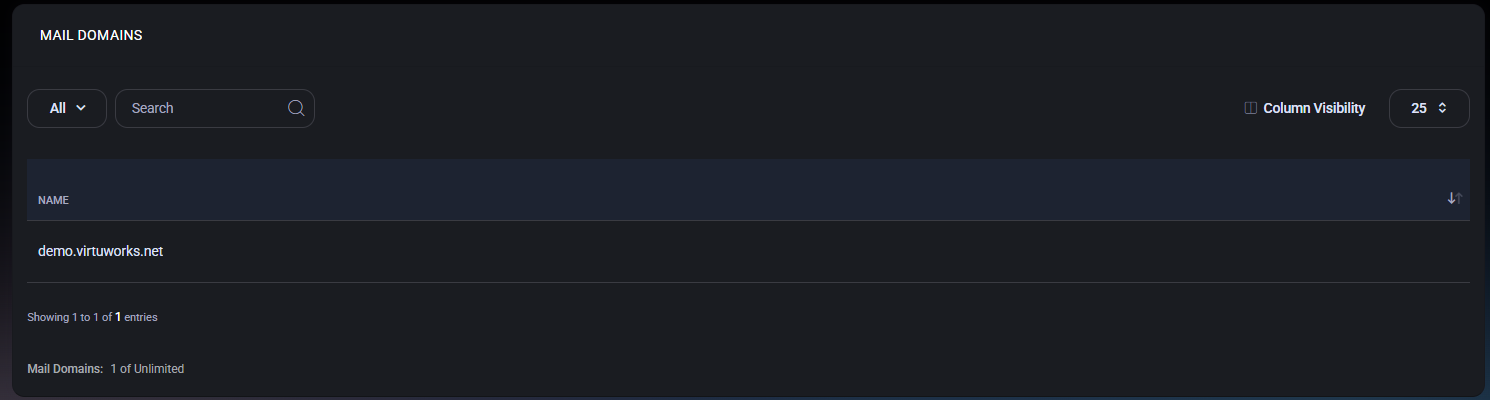
Table of Contents
Section titled “Table of Contents”Overview
Section titled “Overview”Mail objects in MSPControl are always created under a domain (the part after @). Before you create mailboxes and routing objects, you should verify the required domain is present here. If a domain is missing, mail addresses cannot be created under it, even if DNS is already configured externally. Domain availability is controlled by the underlying mail provider configuration.
Domains List Page
Section titled “Domains List Page”The domains list displays domains currently available to the mail system.
Controls
Section titled “Controls”- View Filter (for example, All) – Switches between available views if configured.
- Search – Filters the list by domain name.
- Column Visibility – Shows or hides table columns (if additional columns are enabled in your environment).
- Page Size (for example, 25) – Controls how many domains are shown per page.
Displayed Columns
Section titled “Displayed Columns”- Name – The full domain name (for example, demo.virtuworks.net).
Domain Capacity
Section titled “Domain Capacity”The footer displays domain capacity usage (for example, Mail Domains: 1 of Unlimited). This indicates how many domains are currently present versus the allowed limit for the organization or plan. If your environment enforces a domain limit, this indicator helps you confirm whether you can add additional domains at the mail provider level before they become usable in MSPControl.
Best Practices
Section titled “Best Practices”- Verify the domain exists here before troubleshooting “can’t create address” issues in Accounts, Aliases, Groups, or Lists.
- Keep naming consistent across environments (avoid mixing multiple domain variants unless you have a clear routing and branding policy).
- When a domain is newly added at the mail provider level, re-check this page to confirm it is available for selection in address dropdowns.
- Use the capacity indicator as a quick license/plan sanity check when onboarding new customer domains.