
Customer Email Routes
Overview
Section titled “Overview”Use the Customer Email Routes area while administering a customer account in MSPControl.
Email Routes
Section titled “Email Routes”The Email Routes page provides a read-only overview of how email routing is configured for the customer organization in MSPControl. This section is intended only for visibility and awareness and does not allow any interaction or modification. On the customer level, email routes are fully managed by the service provider. Customers and their peers can only see the list of existing routes exactly as configured on the provider side. More about basics here: https://www.cloudflare.com/learning/email-security/what-is-email-routing/
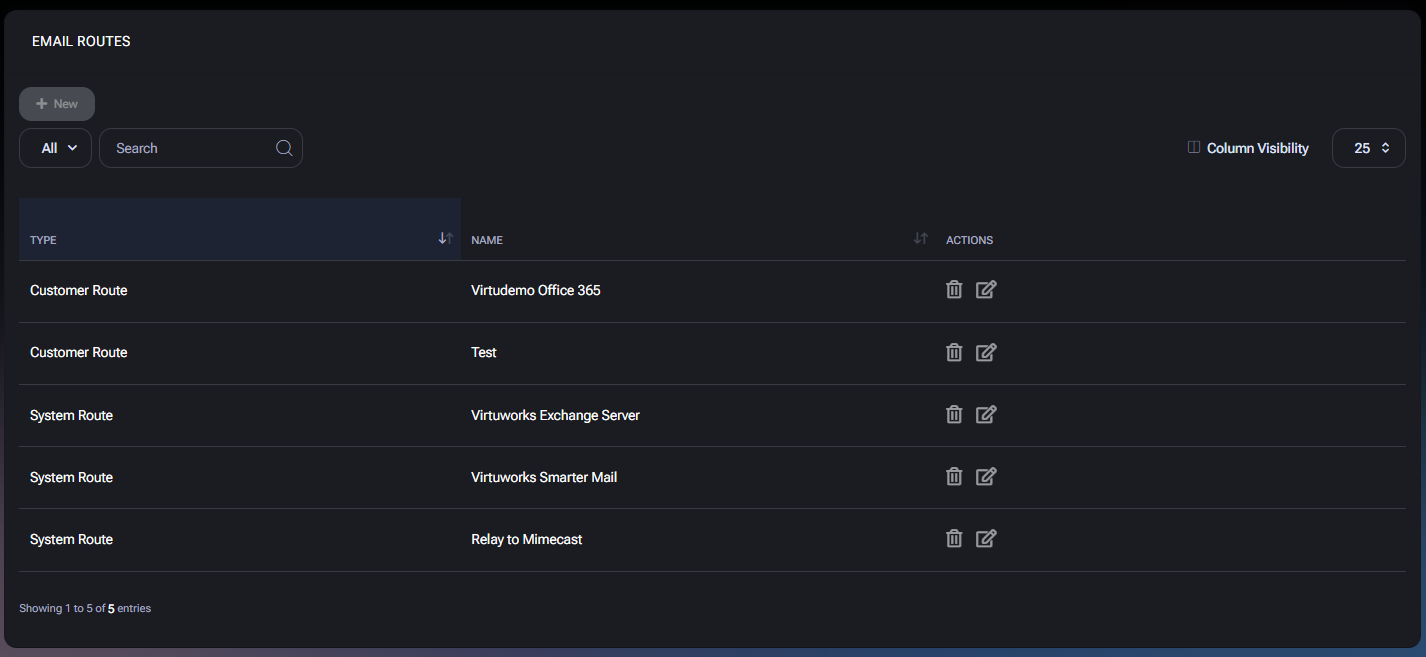
Table of Contents
Section titled “Table of Contents”Overview
Section titled “Overview”Email routes define how email traffic is processed and delivered for domains associated with your organization. This can include routing email to Microsoft 365, on-premises mail servers, provider-hosted mail platforms, or external relay and security services. For customers, this page serves as a reference view only. The actual routing logic, targets, and configuration parameters are controlled centrally by the provider.
Customer Access Level
Section titled “Customer Access Level”Customer access to the Email Routes page is strictly limited.
- Available actions:
- View the list of configured email routes
- Not available:
- Creating new email routes
- Editing existing routes
- Deleting routes
- Opening or modifying route details
Even though action icons may be visible in the interface for consistency with the administrative UI, they are not usable on the customer level.
Routes List View
Section titled “Routes List View”The page displays a table with the following columns:
- Type Indicates whether the route is a Customer Route or a System Route.
- Name The descriptive name of the route. Names and quantity of routes may differ between organizations and depend entirely on provider configuration.
- Actions Shown for UI consistency only. No actions are available for customers.
The list shown in the interface is example-based. Your actual routes may differ depending on how your provider has configured mail flow.
Route Types
Section titled “Route Types”- Customer Route A route logically associated with a specific customer organization. Configuration is still provider-managed.
- System Route A global or shared route defined by the provider and reused across multiple customers.
Important Notes
Section titled “Important Notes”- Email Routes are informational only for customers.
- Any required changes must be requested from your service provider.
- The presence, naming, and number of routes may change over time as the provider updates infrastructure.
- This page is useful when discussing mail flow issues with support, as it allows you to reference existing routing setup.