
Peers Invitations
Overview
Section titled “Overview”Configure and use Peers Invitations from the MSPControl administrator portal.
Peers Invitations
Section titled “Peers Invitations”The Peers Invitations page in MSPControl helps you manage invitations sent when creating a new Peer account.
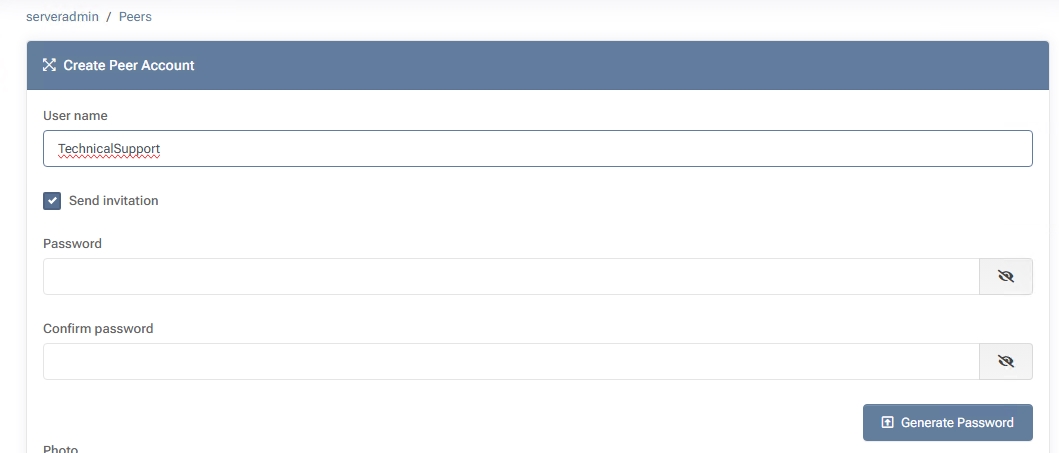
By selecting Send invitation during Create Peer Account, an email is generated with login credentials or a setup link for the new user.
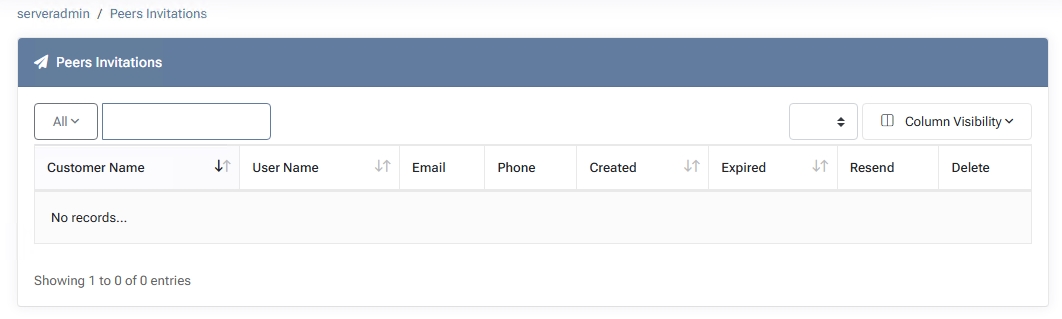
This page displays all such invitations, allowing you to monitor their status and resend or delete them if needed.
Key Features
Section titled “Key Features”- Customer Name Identifies the customer organization associated with the invited peer.
- User Name Shows the username chosen for the peer account.
- Email The address to which the invitation was sent. This is where the user will receive setup instructions.
- Phone An optional phone number, if provided during peer account creation.
- Created The date and time the invitation was generated.
- Expired Indicates whether the invitation link is still valid or has passed its expiration date.
- Resend Allows you to resend the invitation email if the user did not receive or lost it.
- Delete Removes the invitation from the list, typically used for expired or invalid invites.
How to Use Peer Invitations
Section titled “How to Use Peer Invitations”- Create a Peer Account and enable Send invitation to generate an invitation email automatically.
- The new user receives a link or credentials via email, guiding them through the initial login process.
- Access Peers Invitations from the MSPControl menu to view all pending or sent invites.
- Resend an invitation if the user hasn’t received or used it before expiration.
- Delete any outdated or incorrect invitations to keep the list clean.
By leveraging Peer Invitations, MSPControl administrators can streamline the onboarding process for new peers, ensuring they quickly receive the credentials or setup links they need. This approach reduces manual follow-up and enhances security by limiting valid invitation periods. For organizations utilizing Microsoft services, it’s beneficial to understand how external user invitations work. Microsoft’s Graph API allows for programmatic creation of guest user invitations, streamlining onboarding processes in environments integrated with Microsoft 365.