
VirtuBot
Overview
Section titled “Overview”Use the MSPControl VirtuBot capabilities preserved from the legacy product documentation.
The VirtuBot section allows managing the availability and behavior of the VirtuBot service for a specific customer organization in MSPControl. VirtuBot is an auxiliary service that integrates with Microsoft Teams and other Microsoft 365 components to provide automated actions, notifications, and background assistance within the customer environment. At the customer level, this page is used to enable or disable VirtuBot and control how it is deployed and consented for users. All actions are scoped strictly to the selected customer organization.
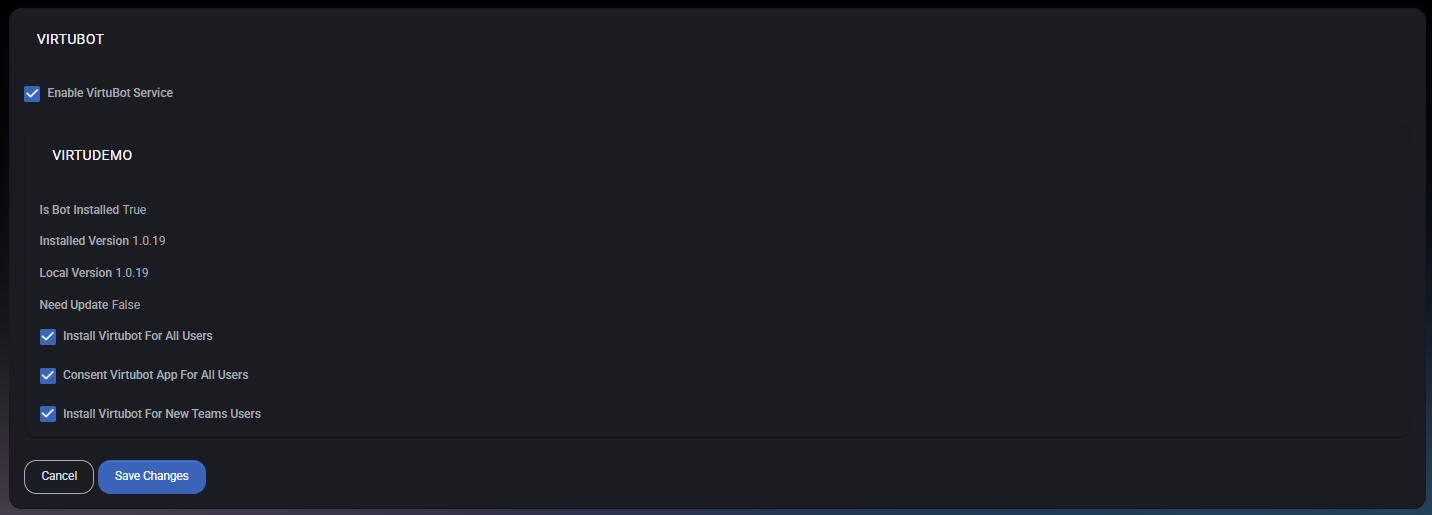
Table of Contents
Section titled “Table of Contents”- Overview
- Service Status Information
- Installation and Consent Options
- Permissions and Scope
- Best Practices
Overview
Section titled “Overview”VirtuBot is an optional service that can be enabled per customer. When enabled, it allows MSPControl to deploy and manage a bot application inside the customer’s Microsoft 365 tenant, typically surfaced through Microsoft Teams. VirtuBot can be used by other MSPControl features and background tasks to:
- Deliver automated notifications
- Support interactive workflows in Teams
- Assist with operational or monitoring-related actions
Disabling VirtuBot immediately prevents the service from being used for the customer.
Service Status Information
Section titled “Service Status Information”The upper section of the page displays the current VirtuBot status for the customer organization, including:
- Is Bot Installed Indicates whether the VirtuBot application is currently installed in the customer tenant.
- Installed Version Shows the version of VirtuBot currently installed.
- Local Version Displays the version available on the MSPControl side.
- Need Update Indicates whether the installed version differs from the local version and requires an update.
This information is read-only and is used to assess deployment health and version alignment.
Installation and Consent Options
Section titled “Installation and Consent Options”The following configuration options control how VirtuBot is deployed and authorized:
- Enable VirtuBot Service Master toggle that enables or disables VirtuBot for the customer.
- Install VirtuBot for All Users Automatically installs the VirtuBot application for all existing users in the customer tenant.
- Consent VirtuBot App for All Users Grants tenant-wide consent to the VirtuBot application, removing the need for individual user approvals.
- Install VirtuBot for New Teams Users Ensures VirtuBot is automatically installed for users who are added to Microsoft Teams in the future.
Changes to these options take effect after clicking Save Changes.
Permissions and Scope
Section titled “Permissions and Scope”VirtuBot configuration at the customer level is limited to the customer’s own tenant:
- No provider-wide or cross-customer control
- No access to VirtuBot settings of other customers
- Actions are restricted by customer peer roles and permissions
The customer cannot modify the internal logic of VirtuBot — only its availability and deployment behavior.
Best Practices
Section titled “Best Practices”- Enable VirtuBot only if features relying on it are actively used.
- Use tenant-wide consent to simplify deployment and avoid user friction.
- Monitor version status to ensure VirtuBot stays up to date.
- Limit VirtuBot access through peer roles to trusted users.
- Disable VirtuBot if it is not required to reduce unused application footprint.