Account Widget
Account widget
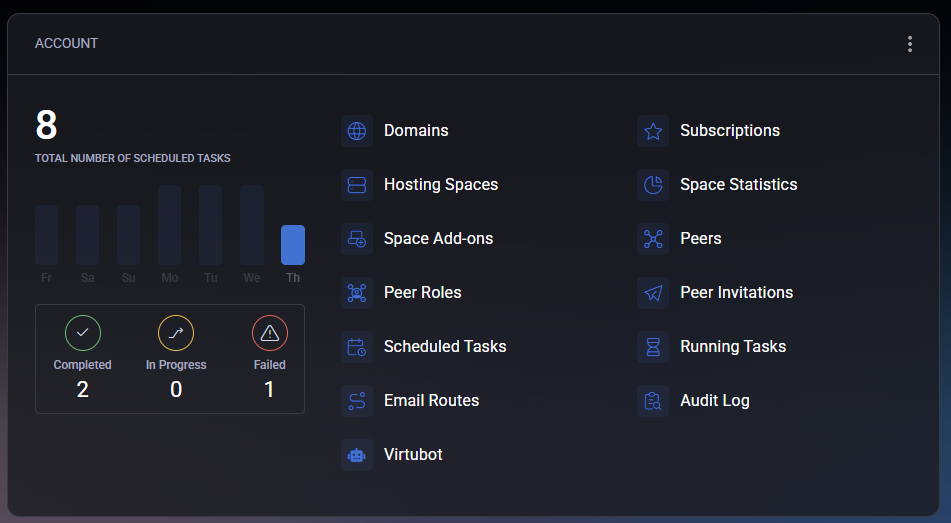
Section titled “Account widget”The Account widget provides a real-time overview of your scheduled tasks and quick links to essential service modules. The upper section shows the Total Number of Scheduled Tasks for the last week, including task distribution by day and status indicators:
- Completed – successfully finished tasks.
- In Progress – tasks currently running.
- Failed – tasks that encountered errors.
The right side of the widget contains shortcut icons to the most frequently used areas:
- Domains – manage all registered domains.
- Hosting Spaces – view and modify hosting environments.
- Subscriptions – manage your current service plans.
- Space Statistics – monitor resource usage within your hosting spaces.
- Space Add-ons – manage optional service extensions.
- Peers and Peer Roles – configure delegated access to your account.
- Scheduled Tasks – view and configure background task automation.
- Email Routes – adjust mail routing and delivery settings.
- Virtubot – open the automation assistant.
- Audit Log – view activity records and system events.
The widget also includes a filter function (accessible from the three-dot menu). Using it, you can select which quick-access tiles are visible. This allows you to customize the dashboard layout to match your workflow. You can also remove the entire widget using Remove Widget from Dashboard.