Hosting Service Widgets
Mail widget
Section titled “Mail widget”The Mail widget provides a summary of the customer’s mail services usage and offers quick access to key management areas related to mailboxes, aliases, groups, and domains. It helps administrators monitor current usage and quickly navigate to specific sections for configuration or troubleshooting.
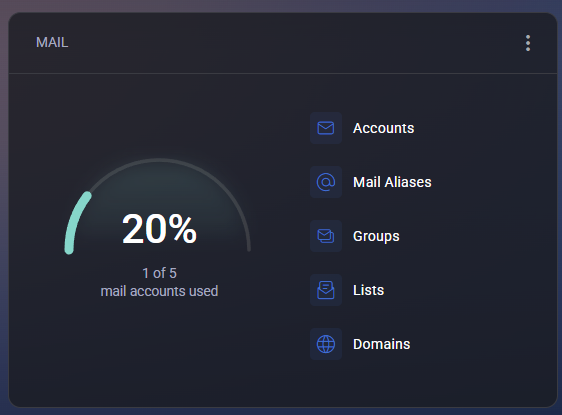
The main dashboard element shows overall mailbox utilization, indicating how many accounts are currently in use out of the total allowed quota. This visual progress indicator provides a quick understanding of mail capacity consumption. The widget includes the following management sections:
- Accounts – view and manage user mailboxes, including mailbox creation, deletion, and configuration of size limits or forwarding rules.
- Mail Aliases – manage alternate email addresses that redirect messages to primary mailboxes.
- Groups – configure distribution groups for shared communication between multiple recipients.
- Lists – manage mailing lists used for automated message delivery to large recipient groups.
- Domains – view and configure domain names used for email services, including DNS-related settings.
Filter options allow customizing the widget display according to user preferences:
- Show Accounts – toggle visibility of the Accounts section.
- Show Mail Aliases – enable or hide alias-related data.
- Show Groups – show or hide group management links.
- Show Lists – toggle display of mailing lists.
- Show Domains – show or hide domain management links.
- Remove Widget from Dashboard – removes the Mail widget from the current dashboard layout.
The Mail widget is designed to offer a compact yet powerful overview of all mail-related resources, simplifying daily administration and ensuring quick access to the most relevant email service functions.
Web widget
Section titled “Web widget”The Web widget provides a detailed overview of the customer’s web hosting resources and their current usage. It displays website, FTP, and IP address utilization, along with direct access to file management and hosting-related configuration tools.
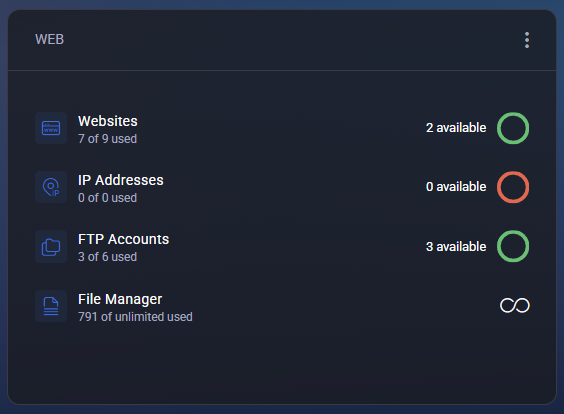
This widget allows users and administrators to quickly assess available hosting capacity, check resource status indicators, and access the corresponding management sections. The widget includes the following categories:
- Websites – shows the number of hosted websites currently used versus the total available. The “available” indicator reflects remaining website slots.
- IP Addresses – displays how many IP addresses are assigned and how many remain available. A red indicator signifies no free addresses left.
- FTP Accounts – provides a quick summary of created FTP accounts out of the total limit and a link to manage user access or credentials.
- File Manager – shows the number of stored files and offers access to the integrated file management interface for uploading, editing, and organizing website content.
Each resource is accompanied by a visual indicator:
- 🟢 Green circle – available capacity.
- 🔴 Red circle – capacity reached or exceeded.
- ∞ Infinity symbol – no limit set for the corresponding resource.
The widget supports flexible customization through filters:
- Show Websites – toggles visibility of website statistics and management access.
- Show IP Addresses – enables or hides IP address information.
- Show FTP Accounts – shows or hides FTP account data.
- Show File Manager – toggles display of file storage usage and quick access link.
- Remove Widget from Dashboard – removes the Web widget from the current dashboard view.
The Web widget provides a concise, visual summary of hosting resource utilization and direct navigation to core management tools, enabling quick status checks and efficient website administration.
Databases widget
Section titled “Databases widget”The Databases widget provides a visual overview of the database resources allocated to the customer’s hosting space. It displays current utilization and offers quick access to database management tools for supported database types such as MySQL and MySQL 8.x.
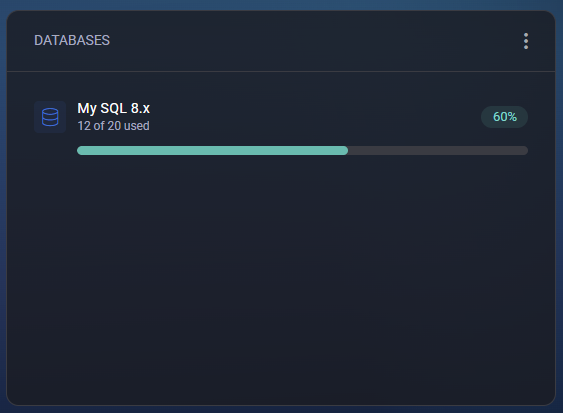
This widget helps administrators and users monitor how many databases are in use and how many are still available within their plan limits. The horizontal progress bar clearly indicates the percentage of consumption for each supported database type. Displayed information includes:
- Database Type – shows the database engine in use (for example, MySQL 8.x or MySQL 5.x).
- Usage Indicator – displays the number of databases currently used versus the total quota (e.g., 12 of 20 used).
- Progress Bar – visualizes resource utilization percentage for quick assessment.
- Usage Percentage Badge – numeric value showing the exact percentage of used capacity (e.g., 60%).
The widget also includes configuration filters available from the context menu:
- Show MySQL 8.x – toggles visibility of the MySQL 8.x usage section.
- Remove Widget from Dashboard – removes the Databases widget from the current dashboard view.
If multiple database engines are supported (e.g., MySQL 5.x and MySQL 8.x), each engine appears as a separate item with its own progress indicator, allowing users to monitor usage per engine type independently. The Databases widget provides a clear, compact summary of all database allocations and usage, helping ensure optimal resource planning and easy access to database administration tools.
