Mail Templates
Overview
Section titled “Overview”Configure and use Mail Templates from the MSPControl administrator portal.
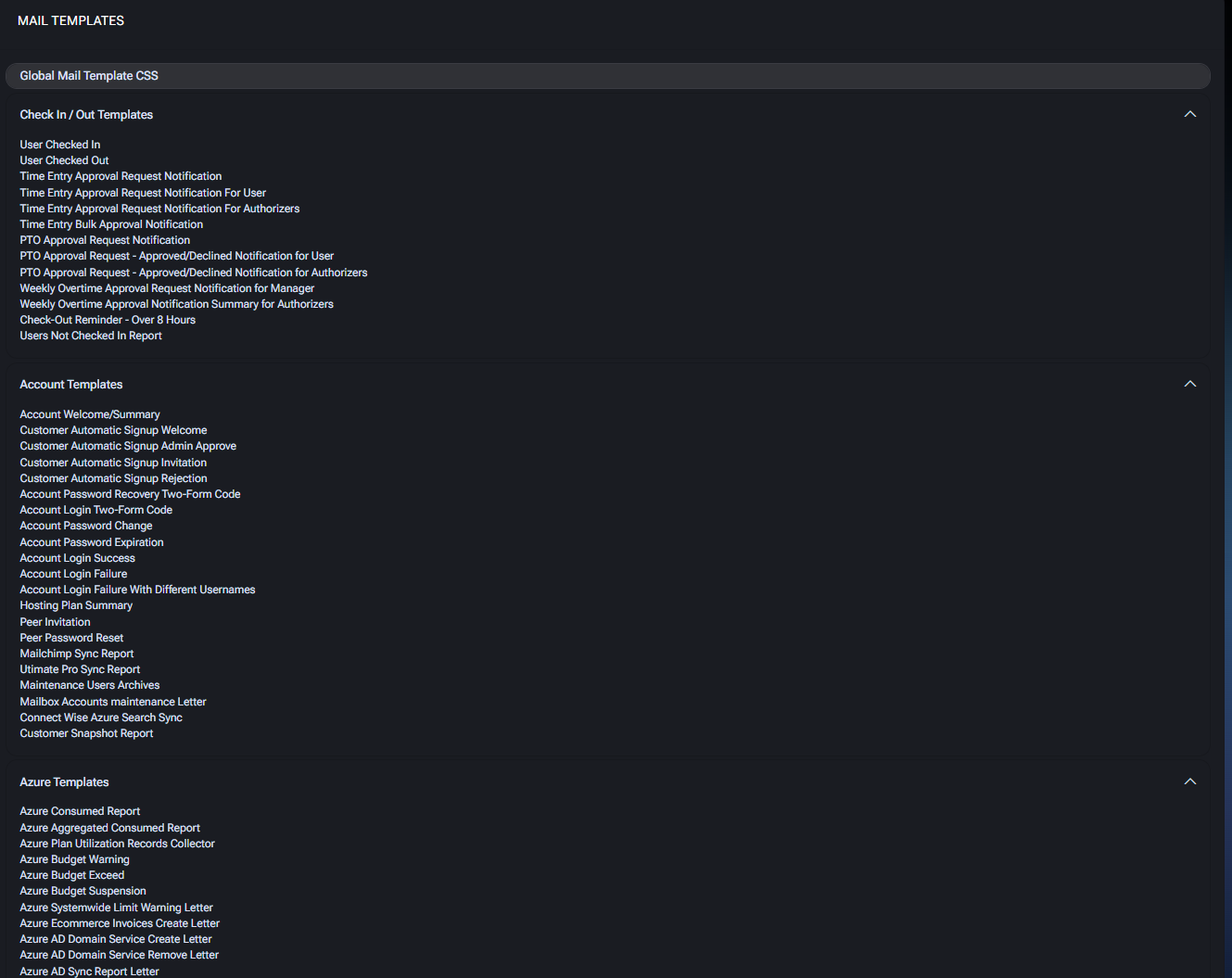
The Mail Templates section provides a comprehensive collection of predefined email templates that cover system notifications, account actions, service updates, reports, and alerts across different modules of MSPControl. Templates can be customized and styled to match organizational requirements.
The twelve groups
Section titled “The twelve groups”Templates are organised into twelve groups on the Settings > Mail Templates screen. The count is the number of distinct templates in each.
| Group | Templates | Sends when |
|---|---|---|
| Check In / Out | 18 | Someone checks in or out, or a time, overtime or PTO request needs a decision |
| Account | 21 | Signup, sign-in, password and peer events on an account |
| Azure | 25 | Consumption, budgets, CSP, GDAP and cloud agreements |
| Organization | 87 | Anything happening to a customer’s users, mailboxes, devices or licences — by far the largest group |
| Reports | 4 | Scheduled platform-wide reports |
| VPS | 1 | A virtual private server is handed over |
| Web | 21 | Domain and certificate expiry, site and WordPress installs, availability checks |
| Ecommerce | 12 | Payments, charges, credit limits and subscription changes |
| Settings | 3 | The platform itself enters or leaves maintenance |
| Documentation | 11 | Requests to view a credential or document, and privileged-access decisions |
| Automation Integration | 4 | An automation request needs a decision, or a team member is activated |
| Skillset Update Request | 4 | A technician claims a skill and someone has to approve it |
Every template in all twelve groups is named below. If you find one on the screen that is not here, the product has gained a template since this page was last reconciled — run node tools/navigation/settings-coverage.mjs in Docs/ to confirm.
Check in / out templates
Section titled “Check in / out templates”The mail side of Check In, MSPControl’s time-tracking module. All 18 templates:
User Checked In Sent when a user checks in. User Checked Out Sent when a user checks out. Daily Change Request Approval Email Alerts authorizers that a day’s time entries need a decision. Daily Change Request Approval Email For User Tells the user their entry is awaiting approval. Daily Change Request Approval Email For Authorizer The authorizer’s copy of the same request. Bulk Change Request Approval Email for Authorizer Several days’ requests in one message. PTO Approval Request Notification A new paid-time-off request needs a decision. PTO Approval Request - Approved/Declined Notification for User The outcome, to the requester. PTO Approval Request - Approved/Declined Notification for Authorizers The outcome, to the approvers. Approved PTO Deleted Notification Sent when already-approved PTO is removed. Weekly Overtime Approval Request Notification for Manager Overtime awaiting a manager’s decision. Weekly Overtime Approval Notification Summary for Authorizers The consolidated weekly overtime summary. Bulk Weekly Overtime Approval Email for Authorizer Several overtime requests in one message. Timesheet Lock Reminder - Employee Warns that the timesheet is about to lock. Timesheet Lock Summary - Weekly The weekly lock summary. Check-Out Reminder - Over N Hours Reminds a user still checked in after the configured number of hours. No Check-Out Summary - Over N Hours Lists everyone who passed that threshold without checking out. Users Not Checked In Report Lists users who have not checked in.
Account Welcome/Summary Welcomes new users and provides a summary of account details. Customer Automatic Signup Welcome Sends a welcome message after a successful customer self-signup. Customer Automatic Signup Admin Approve Notifies admins when a customer signup requires approval. Customer Automatic Signup Invitation Invites users to complete the signup process. Customer Automatic Signup Rejection Informs applicants that their signup request was rejected. Account Password Recovery Two-Form Code Provides a recovery code for secure password resets. Account Login Two-Form Code Sends two-factor authentication code for login verification. Account Password Change Confirms that a user’s account password has been changed. Account Password Expiration Notifies users about upcoming password expiration. Account Login Success Confirms a successful login into the system. Account Login Failure Alerts about failed login attempts. Account Login Failure With Different Usernames Notifies when failed login attempts occur with multiple usernames. Hosting Plan Summary Summarizes hosting plan details for the customer. Peer Invitation Sends invitations to peers for collaboration. Peer Password Reset Provides reset instructions for peer account passwords. Mailchimp Sync Report Summarizes results of Mailchimp synchronization. Utimate Pro Sync Report Provides details on Ultimate Pro synchronization. Maintenance Users Archives Notifies about archived user accounts during maintenance. Mailbox Accounts Maintenance Letter Confirms maintenance actions on mailbox accounts. Connect Wise Azure Search Sync Reports results of ConnectWise Azure directory synchronization. Customer Snapshot Report Provides customers with a snapshot overview of their system usage.
Azure templates
Section titled “Azure templates”Azure Consumed Report Provides a breakdown of Azure consumption per subscription. Azure Aggregated Consumed Report Summarizes consumption across multiple Azure subscriptions. Azure Utilization Records Collector Collects and delivers Azure utilization records. Azure Plan Utilization Records Collector The Azure Plan equivalent — a separate template despite the near-identical name, so check which one you are editing. SharePoint Sites Permissions Report — Complete Reports SharePoint site permissions once the report finishes. Azure Budget Warning Alerts customers when Azure budget usage approaches limits. Azure Budget Exceed Notifies when Azure budget has been exceeded. Azure Budget Suspension Informs customers of subscription suspension due to budget overrun. Azure Systemwide Limit Warning Letter Warns about hitting global Azure system resource limits. Azure AD Domain Service Create Letter Confirms creation of Azure AD Domain Services. Azure AD Domain Service Remove Letter Confirms removal of Azure AD Domain Services. Azure AD Sync Report Letter Provides synchronization details between Azure AD and MSPControl. Transition to Azure Plan Letter Notifies customers about migration to Azure plans. Cloud Agreement Notification Informs customers about new cloud agreements. Cloud Agreement Accepted Notification Confirms customer acceptance of a cloud agreement. Cloud Agreements Report Summarizes all active customer cloud agreements. Remove Expired Guest Users Letter Notifies administrators of expired guest users being removed. Import New Commerce Offers Letter Confirms import of new commerce offers. Remove Customers Partner Relationship Letter Confirms removal of partner relationship with customers. Change Azure Subscription Friendly Name Letter Confirms changes to the subscription friendly name. Tenants Applications Credentials Regenerate Letter Notifies about regenerated application credentials. GDAP Admin Relationships Checking Letter Reports on GDAP admin relationship status. GDAP Admin Relationships Approval Invitation Letter Sends invitation to approve GDAP relationship. Azure Advisor Recommendations Provides recommendations from Azure Advisor. Partner Invitation Letter Sends partner relationship invitations. O365 Subscriptions Expiration Report Reports on Office 365 subscriptions nearing expiration.
Organization templates
Section titled “Organization templates”The largest group by a wide margin — 87 templates covering everything that can happen to a customer’s users, mailboxes, licences and devices.
Passwords and account access
Section titled “Passwords and account access”Password Policy Report The password policies in force. Password Never Expires Flags accounts set never to expire. Account Password Expiration Warns a user their password is expiring. Account Password Change Confirms a password change. Password Reset Reset instructions. Password Reset Reminder Chases an outstanding reset. Password Reset Two-Form Code The second factor for a reset. New Account Password Request A password request for a new account. Password Changes Pending Report Accounts awaiting a password change. Customer Password Changes Pending Report The same, at customer level.
User lifecycle and Microsoft 365
Section titled “User lifecycle and Microsoft 365”Account Creation Success Notification / Account Creation Failure Notification and Account Deletion Success Notification / Account Deletion Failure Notification report each outcome separately. Mailbox Deletion Success Notification / Mailbox Deletion Failure Notification do the same for mailboxes. New Office 365 User A user has been created in Microsoft 365. Azure AD Users Import Notification Results of an import. Sync/unsync Users with Office 365 Sync results. Change Office 365 Licenses Notification, Assign Office 365 License to Users Notification and Change Office 365 Licenses Service Plans cover licence changes. Migrate To New Commerce Notification New Commerce migration. New OneDrive Owner Notification OneDrive ownership has moved. Assign Entra ID Global Administrator Role to User Notification Someone has been granted Global Administrator. Set Location for Users Notification Usage location set. Set Disable User Options Letter A user has been disabled.
Setup and provisioning
Section titled “Setup and provisioning”Exchange Mailbox Setup Mailbox setup complete. Remote Desktop Services Setup RDS setup complete. Create personal folder A personal folder has been created. Generate Missing Managers Manager fields filled in. Account Welcome/Summary The welcome message for a new organization account.
User, group and access reports
Section titled “User, group and access reports”Users Report All users. Guest Users Report — Complete Guest accounts, sent when the report finishes. Orphaned AD Users Report AD accounts with no matching user. RDS Users Report RDS-enabled users. Enterprise Solution Report Enterprise service usage. User MFA Not Configured Warning Users without MFA. Inactive Accounts Notification - Organization Level and Inactive Accounts Notification - Serveradmin Level Dormant accounts. Missing O365 Users Notification - Organization Level and Missing O365 Users Notification - Serveradmin Level Users absent from Microsoft 365.
Distribution lists and groups: Exchange Distribution Lists Report, Exchange Online Distribution Lists Report, Exchange Online Mail-Enabled Security Groups Report, Empty Distribution Lists Report, Empty Distribution Lists Report. Customer Level, Empty Distribution Lists Report. Group Manager Level, Empty Distribution List Auto-Assignment Notification, Security Groups Export Complete and Security Groups Export Failed.
Devices
Section titled “Devices”Devices Report The device inventory. Devices Missing Updates Report Devices behind on patching. Device Health Score Report Health scoring. Device Applications Update Report Application update results. Devices Local Users Report Local accounts found on devices. Agent Logs Agent log delivery.
Storage, backup and cloud folders
Section titled “Storage, backup and cloud folders”Veeam Backup Report and Azure Backup Report Backup outcomes. Cloud Folders Overage Report Cloud folder usage over quota. Cloud Files Checkup Report / Customer Cloud Files Checkup Report File checkup results. Repair Cloud Folders and Repair OneDrive Shortcuts Report Repair outcomes. Mailboxes Space Report - Serveradmin Level and Mailboxes Space Report - Organization Level Mailbox storage. Archive Maintenance Report Archive maintenance. Mailbox Archiving Result Notification The result of an archiving run. PST eDiscovery Search Result Notification eDiscovery search results. Fault Set Folder Permissions Letter template Reports a folder-permission failure.
Compliance and audit
Section titled “Compliance and audit”Security Compliance Report and Security Compliance Report. Customer Level Compliance posture. Unified Audit Log Report and Unified Audit Log Report. Customer Level Audit log extracts. Global Quarantine Report and Global Quarantine Report. Customer Level Quarantined mail. SCA - RDS Users with non-complaint License RDS users whose licensing does not comply. QMTH Program Monthly Report The monthly QMTH report.
Integrations
Section titled “Integrations”ConnectWise Sync Report, ServiceDesk/ConnectWise Sync Report and ServiceDesk/ConnectWise Sync Report. Customer Level. Google Domain Shared Contacts Sync Report and Google Domain Shared Contacts Sync Report. Customer Level.
Verification and account changes
Section titled “Verification and account changes”Organization User Verification Letter, Organization User Verification Pin-code Letter and Organization User Verification Notification Letter carry the user verification flow. Spaces Add-ons Changes Notification Reports a change to a space’s add-ons.
Reports templates
Section titled “Reports templates”Scheduled, platform-wide reports: Customers Quotas Report, Unprotected Domains Report, Locations IP Addresses Report, Windows Agent Policy Report — Complete.
VPS templates
Section titled “VPS templates”One template: VPS Welcome/Summary, the handover message for a new virtual private server.
Web templates
Section titled “Web templates”Domain, certificate and website events — the group most likely to reach a customer directly.
Domain and DNS monitoring: DNS Monitoring - Domains Expiring Notification, DNS Monitoring - Domains Expiring Notification. Customer Level, DNS Monitoring - Domain Expiring Notification Disabled. Customer Level, DNS Monitoring - Domain Enable Auto Renew Notification. Customer Level, DNS Monitoring - Domain No Longer Renew Enabled Notification. Customer Level, DNS Monitoring - Nameserver/MX Record Change Notification.
Certificates: Let’s Encrypt Renewal Notification - Account Level, Let’s Encrypt Renewal Notification - Serveradmin Level.
Site health and provisioning: CheckWebSitePointers, Check Website Availability, Install Website Success Notification, Install Website Failure Notification, Add Website Success Notification - Serveradmin Level, Install Wordpress Success Notification - Account Level, Install Wordpress Failure Notification - Account Level, Install Wordpress Success Notification - Serveradmin Level, Install Wordpress Failure Notification - Serveradmin Level, Wordpress Report.
Also in this group: FTP Inactivity Report, Scheduled Tasks Report, Device Connection Alerts.
Ecommerce templates
Section titled “Ecommerce templates”Billing events: Payment Success, Payment Failed, Failed Charges, Invoices, Account Statement, Credit Limit Exceeded, Space /Add-on Suspended, Subscriptions Suspended, New Subscription, Add-on Added to Subscription, Subscription Cancelled, Subscription Term Changed.
Settings templates
Section titled “Settings templates”Three platform-level notices: System Goes Into Maintenance Mode, System Goes Out Of Maintenance Mode, Database Migration Failed Notification.
Documentation templates
Section titled “Documentation templates”Requests to see a stored credential or document, and the decisions on them: Request For Item View, Request For Item View - Two-Form Code, Approved/Rejected Request for Item View, Access for Passwords List View, Passwords Access Notification, Privileged Access Request, Privileged Access Request - Two-Form Code, Privileged Access Request - Approved/Rejected Notification for User, Privileged Access Request - Approved/Rejected Notification for Authorizers, Expiring Certificates, Asset Disposition Update Report.
These carry the approval flow described in privileged access. Disabling one does not disable the approval — it removes the notification, leaving requests sitting unanswered.
Automation integration templates
Section titled “Automation integration templates”Automation Request Notification, Automation Request Decision Notification, Automation Request Outcome Notification, New Team Member Activation Notice.
Skillset update request templates
Section titled “Skillset update request templates”Skillset Update Request Invitation, Skillset Update Request Notification for Authorizers, Skillset Update Request - Approval Status Notification for Authorizers, Skillset Update Request - Decision Notification for Peer.
Template editor
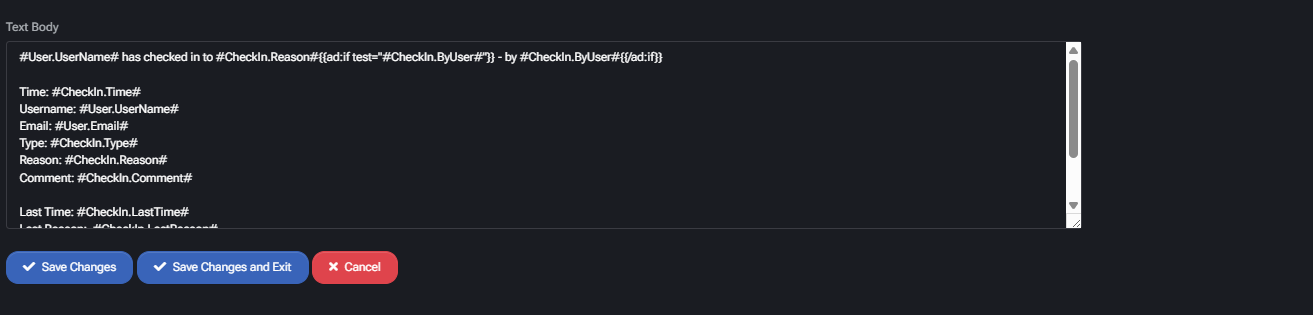
Section titled “Template editor”All mail templates use a unified Template Editor. This editor supports:
- Editing Subject and Body of the email using HTML or plain text.
- Inserting Available Variables specific to each template (e.g., user name, subscription ID, invoice number).
- Adding CC and BCC recipients.
- Adjusting priority and delivery options.
- Styling messages with Global Mail Template CSS for consistent branding.
- Preview mode to test email formatting before applying changes.
- Rollback to default template if errors occur during editing.
Each template page includes a list of Available Variables. These differ depending on the template and cannot be shared across unrelated templates.
Best practices
Section titled “Best practices”- Customize subjects and bodies to reflect company tone and compliance requirements.
- Test templates with sample variable values to ensure accuracy.
- Apply Global Mail Template CSS for consistent branding across all messages.
- Use CC/BCC sparingly to avoid unnecessary data exposure.
- Regularly review and update templates to match current business processes.
