Device Profile and General Settings
Device profile
Section titled “Device profile”For the operational process around supported Defender deployment settings, device findings and customer follow-up, see Microsoft Defender multi-tenant operations. Confirm the effective policy and Microsoft prerequisites before rollout, then verify the resulting protection state.
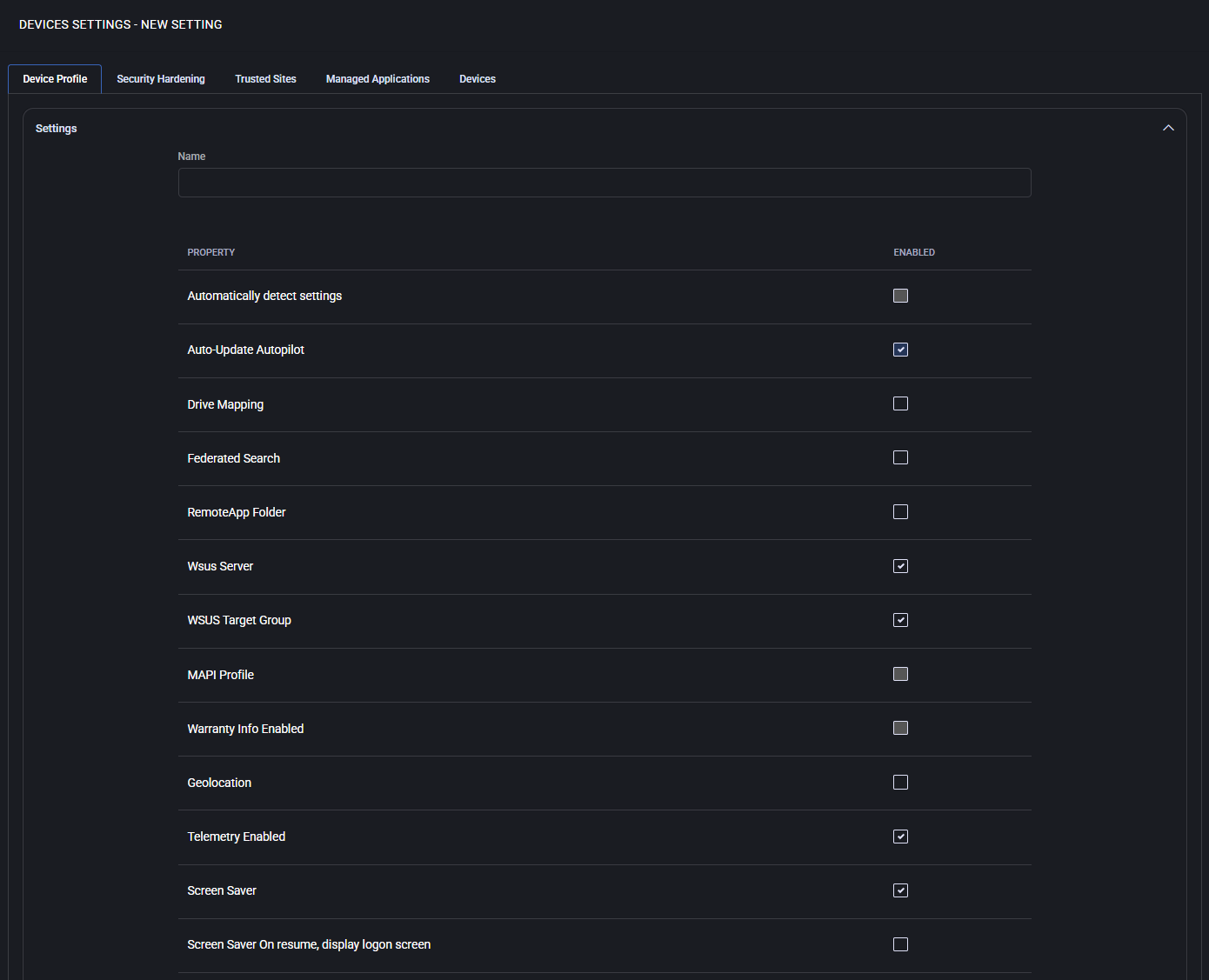
The Device Profile tab contains system-wide configuration options for devices managed by MSPControl Autopilot. These include core Windows behaviors such as automatic detection, screen saver timeout, telemetry settings, WSUS configuration, and integration with external services like Intune. These profiles define how the device behaves and integrates within the centrally managed IT environment through Autopilot.
Subsections
Section titled “Subsections”- Settings
- Windows Update Settings
- Third Party Patching
- Intune
- Windows Disk Cleanup
- Device Local Admin
Settings
Section titled “Settings”This section defines base-level system properties that influence both user experience and administrative behavior. Each item represents a feature that can be toggled ON or OFF per policy.
- Automatically detect settings Enables the system to automatically detect proxy or network settings. Useful in dynamic or roaming environments where devices frequently change networks.
- Auto-Update Autopilot Automatically updates Windows Autopilot profile settings, ensuring that devices stay aligned with the latest provisioning configurations.
- Drive Mapping Allows configuration of network drive mappings, automatically connecting the user to shared resources such as file servers or departmental folders.
- Federated Search Enables the use of federated search functionality, allowing Windows Search to query remote data sources or enterprise search connectors.
- RemoteApp Folder When enabled, groups all RemoteApp shortcuts into a folder within the Start Menu or desktop environment for better organization and access.
- WSUS Server Allows specifying a custom Windows Server Update Services (WSUS) server URL, redirecting update delivery from Microsoft’s public service to a local server for controlled patch deployment.
- WSUS Target Group Specifies the group name that this device should belong to on the WSUS server. This allows grouping machines for staged rollouts or testing updates on specific subsets of devices.
- MAPI Profile Enables support for Messaging Application Programming Interface (MAPI) profiles, typically used by Microsoft Outlook. Required in environments with on-premise Exchange or hybrid mail systems.
- Warranty Info Enabled Activates retrieval of warranty data from hardware vendors (if supported), making it available in reports and device health dashboards.
- Geolocation Allows the device to use built-in location services, such as Wi-Fi triangulation or GPS (if available), to provide geographic information to management systems.
- Telemetry Enabled Controls whether Windows can send telemetry data to Microsoft. This setting may be needed for compliance, diagnostics, or integration with Microsoft services.
- Screen Saver Lets you enforce a screen saver type (e.g. Blank, Bubbles, Ribbons, etc.). Can be paired with security policies for screen lock on inactivity.
- Screen Saver On resume, display logon screen If enabled, the device will prompt for user credentials upon resuming from the screen saver, enhancing session security.
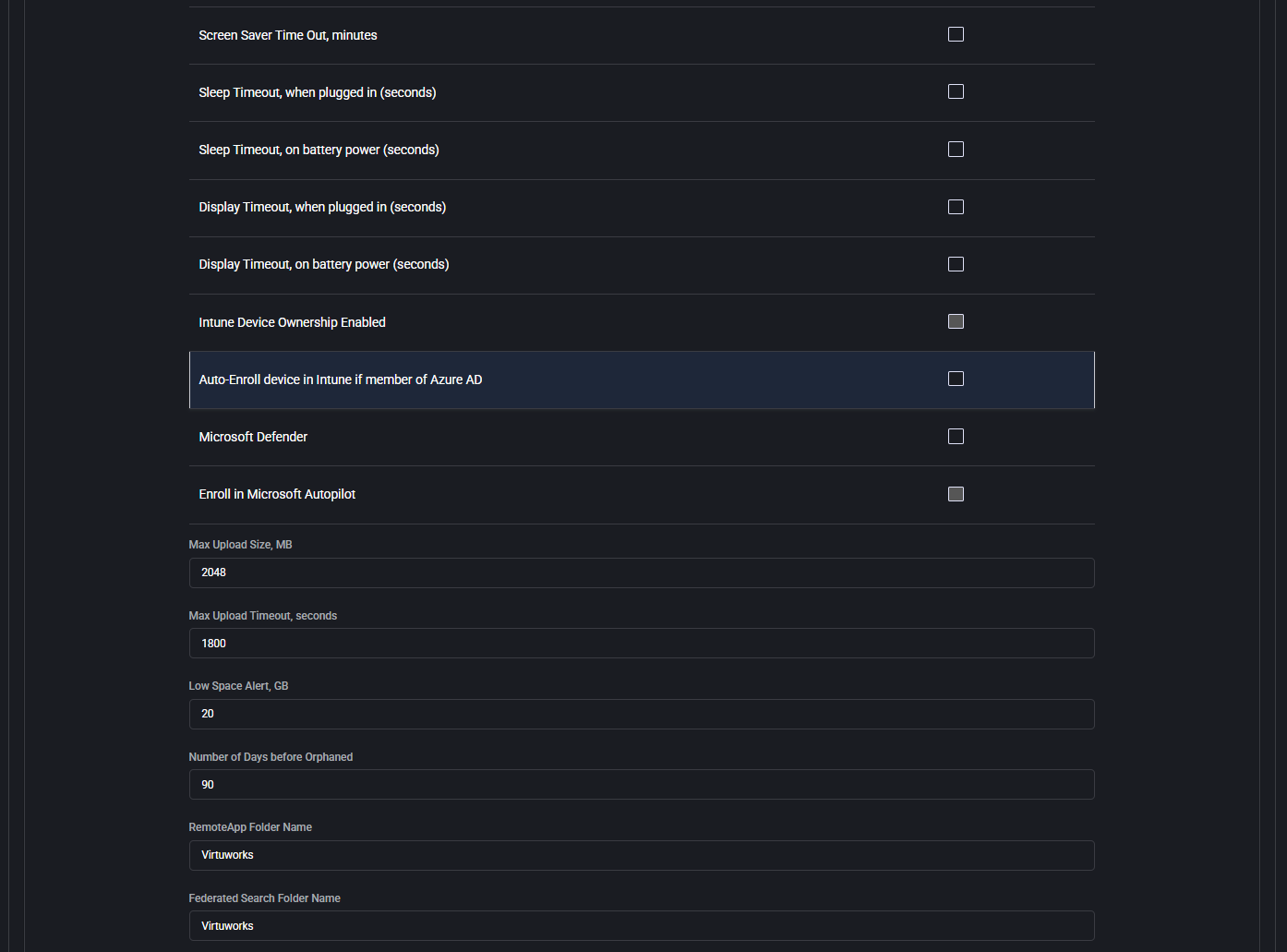
- Screen Saver Time Out, minutes Specifies the idle time (in minutes) before the screen saver activates. Used to enforce inactivity behavior.
- Sleep Timeout, when plugged in (seconds) Determines how long the device waits while plugged in before entering sleep mode. Set to
0to disable. - Sleep Timeout, on battery power (seconds) Same as above, but applies only when running on battery. Helps conserve power in mobile scenarios.
- Display Timeout, when plugged in (seconds) Defines when the display should turn off due to inactivity while charging or on AC power.
- Display Timeout, on battery power (seconds) Sets display off time while running on battery, helping extend battery life.
- Intune Device Ownership Enabled Enables the system to assign device ownership in Microsoft Intune. Used in corporate-managed environments.
- Auto-Enroll device in Intune if member of Azure AD Automates device enrollment in Microsoft Intune if the device is joined to Azure Active Directory. Ensures policy compliance without user intervention.
- Microsoft Defender Enables or disables Microsoft Defender antivirus protection. This can be managed centrally for environments with third-party security solutions.
- Enroll in Microsoft Autopilot Enrolls the device into Microsoft Autopilot for automated provisioning and zero-touch deployment. Recommended for standardizing device setup workflows.
- Max Upload Size, MB Sets the maximum allowed upload size in megabytes for operations like logs, diagnostics, or file transfers through the agent.
- Max Upload Timeout, seconds Defines the time limit (in seconds) for upload operations before timing out.
- Low Space Alert, GB Sets a threshold (in gigabytes) below which the system will generate alerts about low disk space.
- Number of Days before Orphaned Defines how many days a device can remain inactive or unlinked before being flagged as orphaned for further review or cleanup.
- RemoteApp Folder Name Specifies the name of the folder where RemoteApp shortcuts will be placed. Helps organize access to remote apps in the user interface.
- Federated Search Folder Name Names the folder used to group federated search resources, improving visibility and categorization for users.
- MAPI Profile Type Defines whether the Messaging Application Programming Interface (MAPI) profile is configured for On Premise or Hosted Exchange environments. This affects how mail clients interact with the Exchange server.
- MAPI Exchange Cache Determines the cache mode for Outlook clients using MAPI. Options may include Default, Enabled, or Disabled.
- WSUS Server Specifies the URL of the Windows Server Update Services (WSUS) server. Devices will use this path to receive Windows updates.
- OS for Feature Update Group Allows selecting specific Windows OS versions that are targeted for feature updates. This enables granular update control across various device types.
- Screen Saver Sets the screen saver behavior. Options may include None, Blank, or custom modes to align with organizational policies.
- On resume, display logon screen When enabled, users must authenticate after screen saver deactivates, enhancing security.