SharePoint and Organization Policies
SharePoint policy
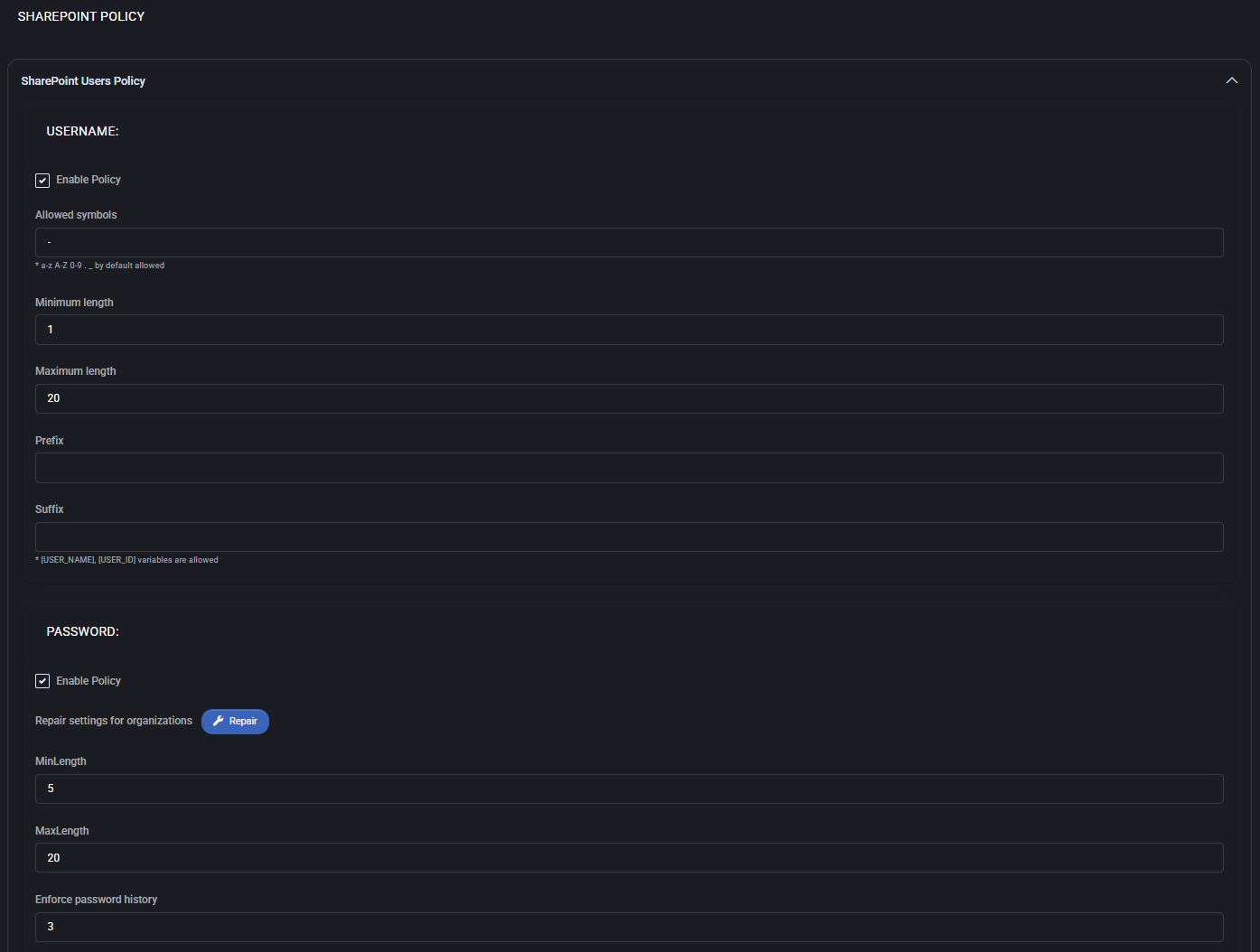
Section titled “SharePoint policy”The SharePoint Policy section defines rules for usernames, group names, password complexity, expiration periods, and end-user portal behavior. These policies help enforce consistency, security, and operational standards across your SharePoint environment.
SharePoint users policy
Section titled “SharePoint users policy”This section allows you to define user-specific rules for SharePoint access.
Username
Section titled “Username”- Enable Policy: Activate custom username rules.
- Allowed symbols: Define acceptable characters; by default, a-z, A-Z, 0-9 are allowed.
- Minimum length: Set the shortest acceptable username length.
- Maximum length: Set the longest acceptable username length.
- Prefix: Optional static prefix for all usernames.
- Suffix: Optional static or dynamic suffix; variables such as
{USER_NAME}and{USER_ID}are supported.
Password
Section titled “Password”- Enable Policy: Enable or disable custom password policy.
- Repair settings for organizations: Reset non-compliant settings with one click.
- MinLength / MaxLength: Define minimum and maximum password lengths.
- Enforce password history: Number of unique passwords remembered before reuse is allowed.
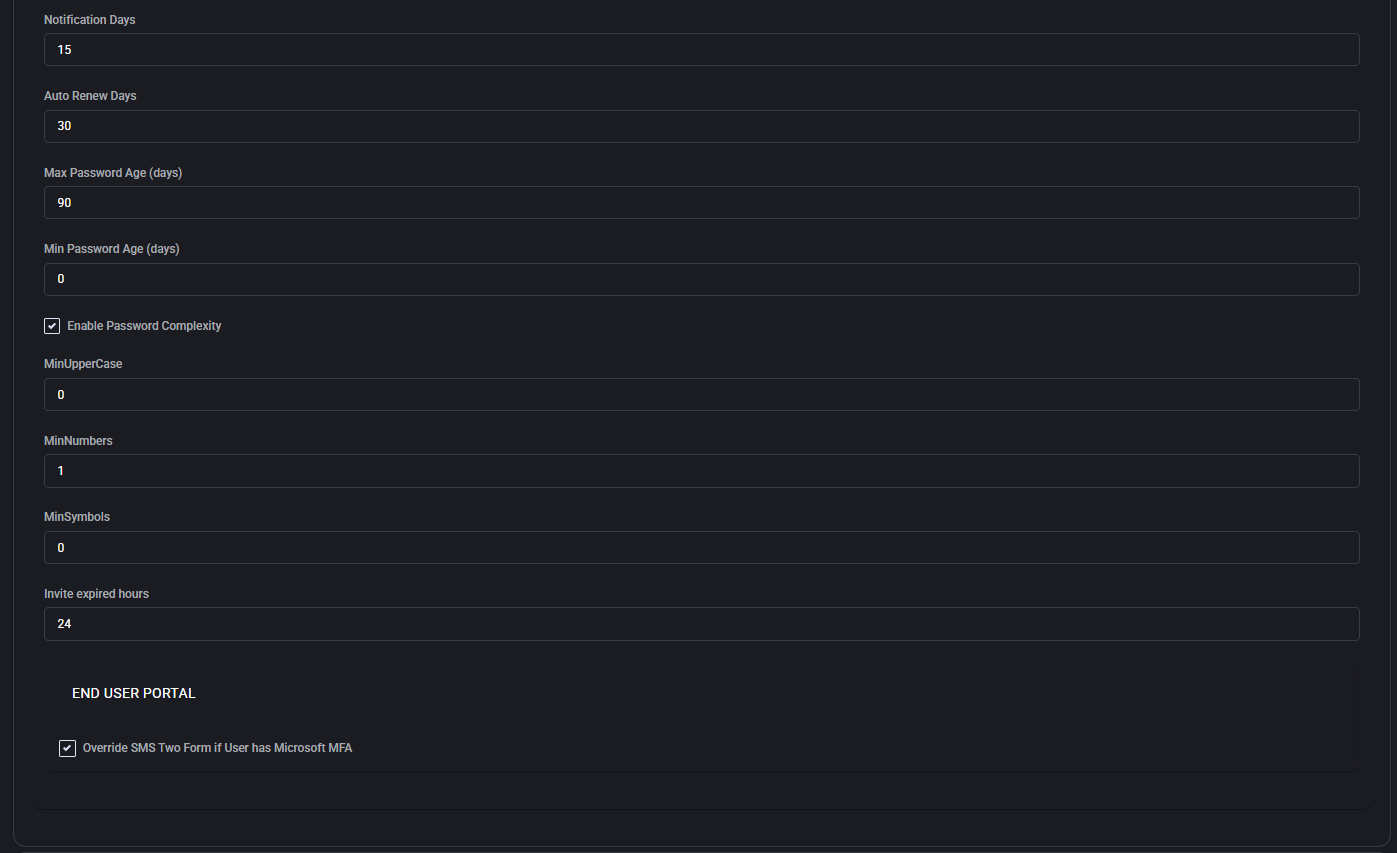
- Notification Days: When to notify users prior to password expiration.
- Auto Renew Days: Automatic renewal window before expiry.
- Max Password Age / Min Password Age: Define how long passwords remain valid or when they can be changed.
- Enable Password Complexity: Toggle complexity enforcement options.
- MinUpperCase / MinNumbers / MinSymbols: Set minimum character requirements for complexity.
- Invite expired hours: Time limit for invite link expiration.
End user portal
Section titled “End user portal”- Override SMS Two Form if User has Microsoft MFA: Bypass internal 2FA if Microsoft MFA is already in place.
SharePoint groups policy
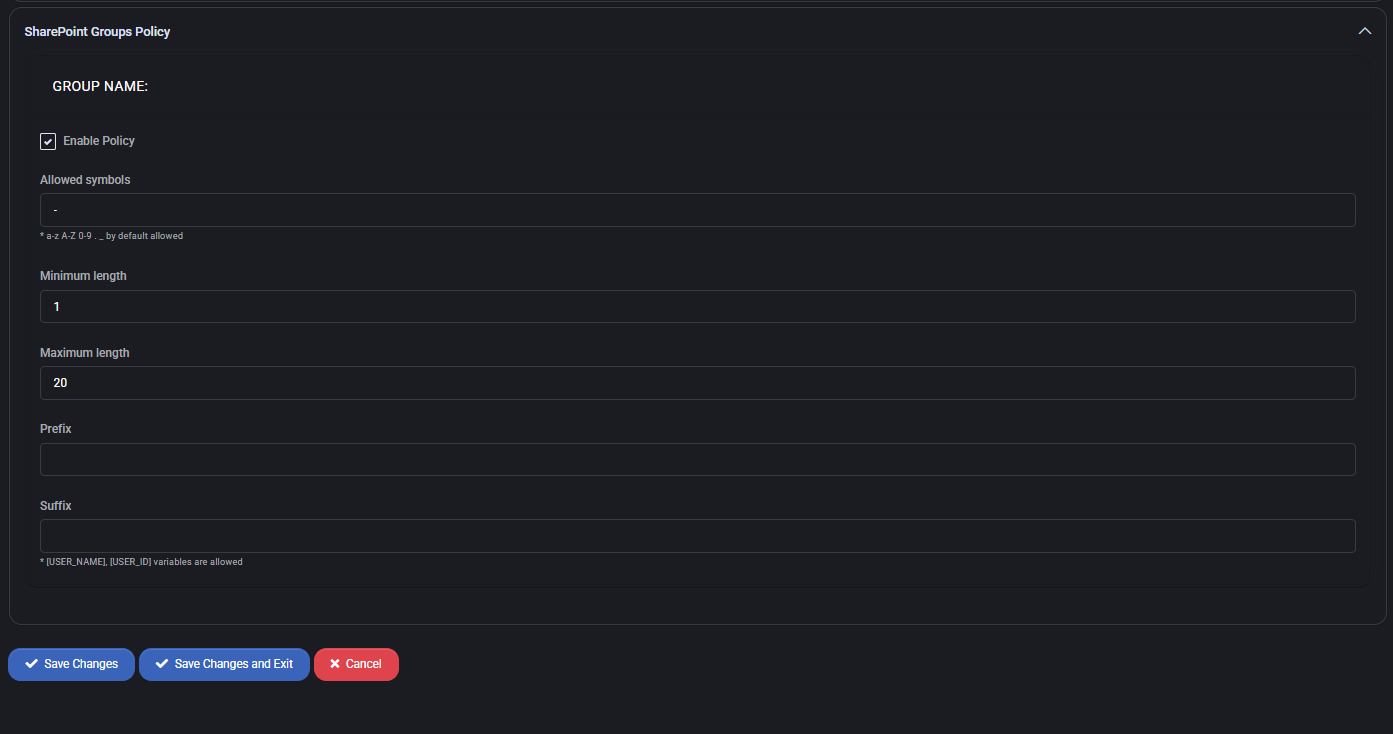
Section titled “SharePoint groups policy”This section allows you to define naming rules for SharePoint groups, similar to user account naming policies.
- Enable Policy: Enforces the group naming rules defined below.
- Allowed symbols: Define special characters allowed in group names; a-z, A-Z, 0-9 are always allowed by default.
- Minimum length: Set the shortest acceptable group name.
- Maximum length: Set the maximum length of group names.
- Prefix: Optional static prefix for group names to enforce consistency.
- Suffix: Optional suffix; can include dynamic variables like
{USER_NAME}and{USER_ID}.
Best practices
Section titled “Best practices”- Use consistent naming conventions for both users and groups to streamline management and automation workflows.
- Limit allowed symbols to ensure compatibility with downstream systems and integrations.
- Enable password complexity and set minimum requirements to meet common compliance frameworks.
- Use dynamic suffixes in usernames and group names when appropriate to guarantee uniqueness.
- Set realistic expiration periods and enable user notifications to avoid unexpected access lockouts.
- If using Microsoft MFA, enable the override option to simplify the authentication process for users.
Hosted organization policy
Section titled “Hosted organization policy”The Hosted Organization Policy section defines rules for user credentials, security, authentication, organization identifiers, archive settings, migration options, and related notifications. These policies enforce consistent behavior and compliance across all hosted organizations managed in MSPControl.
Check password for exposure in prior breach
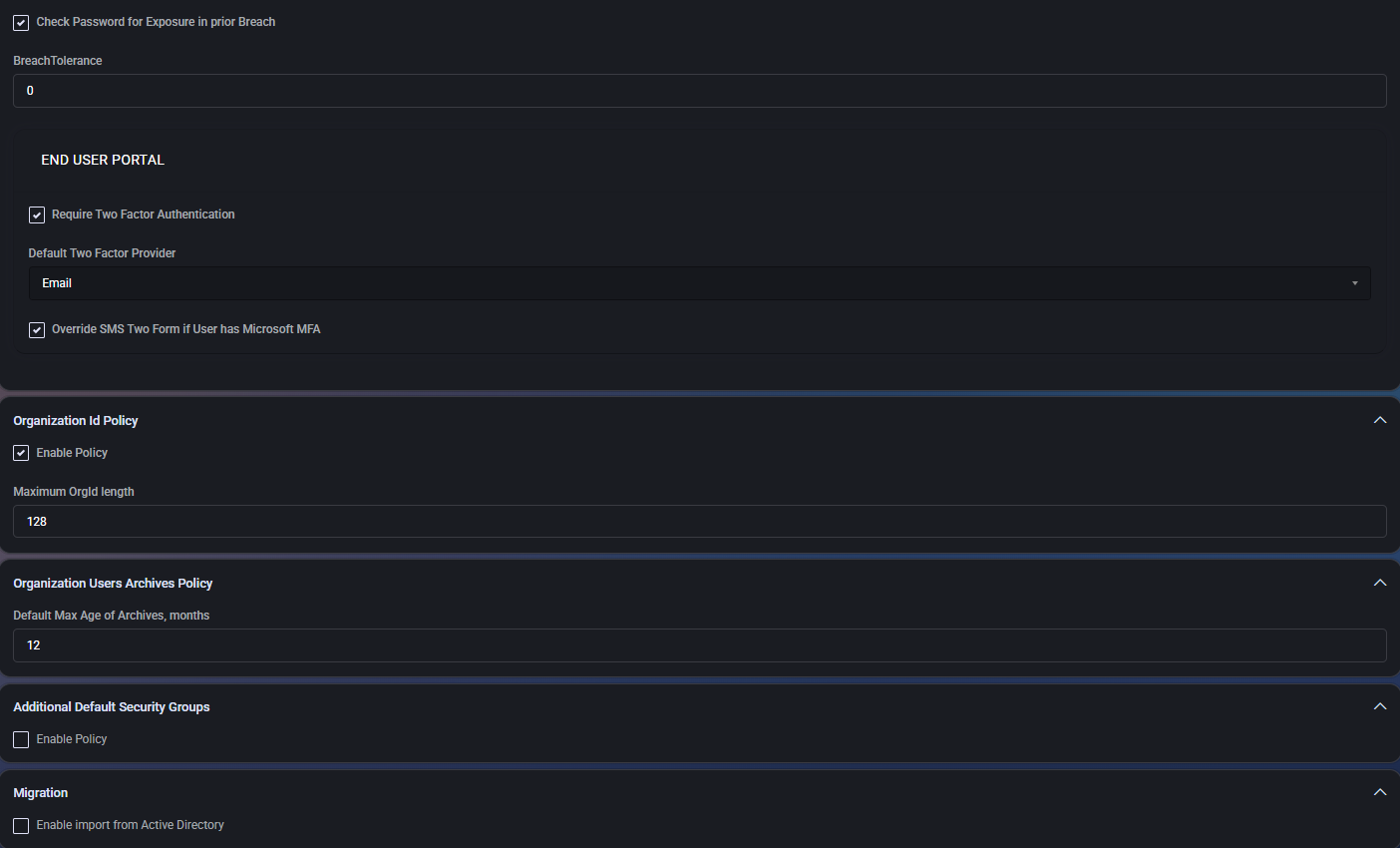
Section titled “Check password for exposure in prior breach”Activates a check against known breach databases (such as HaveIBeenPwned) when new passwords are set. If the password has been previously exposed, the system can prompt users to select a more secure alternative.
- Breach Tolerance: Set to
0by default, disallowing any exposed passwords.
End user portal settings
Section titled “End user portal settings”Controls how users authenticate and interact with the portal.
- Require Two Factor Authentication: Forces MFA for portal access.
- Default Two Factor Provider: Specifies the primary provider used (e.g., Email).
- Override SMS Two Form if User has Microsoft MFA: Prevents double-MFA scenarios if the user is already protected by Microsoft.
Organization ID policy
Section titled “Organization ID policy”Defines constraints for organization identifiers.
- Enable Policy: Enforces this policy when checked.
- Maximum OrgId Length: Sets a length limit (default:
128characters).
Organization users archives policy
Section titled “Organization users archives policy”Controls automatic archival of user accounts.
- Default Max Age of Archives: Defines maximum age in months before automatic archiving (default:
12).
Additional default security groups
Section titled “Additional default security groups”Optionally applies additional security groups to new users or organizations.
- Enable Policy: Enables this functionality.
Migration
Section titled “Migration”Handles directory synchronization options.
- Enable import from Active Directory: Imports and manages users from on-premise AD infrastructure.
User password policy
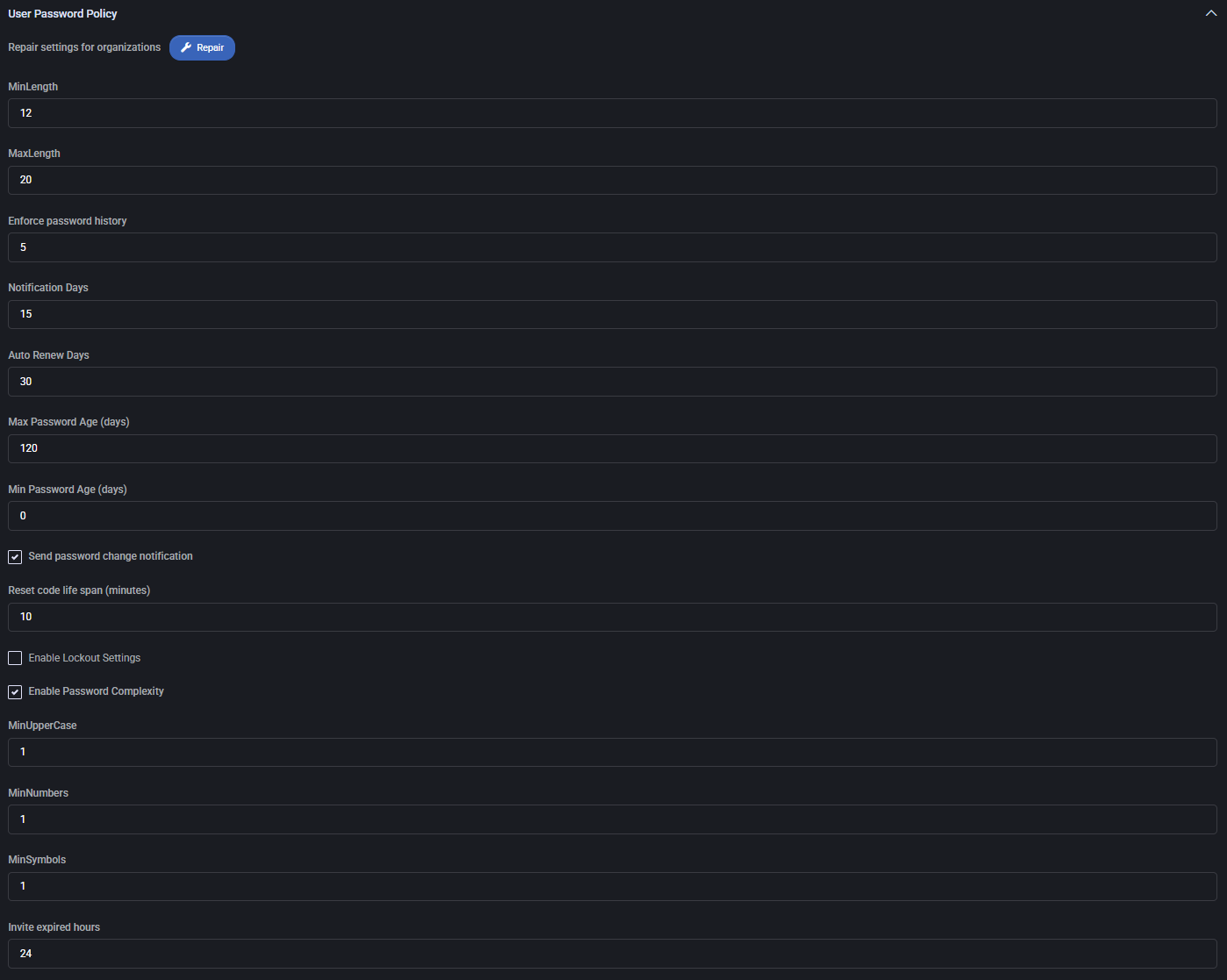
Section titled “User password policy”Sets restrictions and behavior for user passwords within hosted organizations.
- Repair Settings: Resets organizational password policies to default values.
- MinLength: Minimum password length (default:
12). - MaxLength: Maximum password length (default:
20). - Enforce Password History: Prevents reusing recent passwords (default: last
5). - Notification Days: Alerts users before expiration (default:
15days). - Auto Renew Days: Duration between automatic password resets (default:
30days). - Max Password Age: Expiration period in days (default:
120). - Min Password Age: Prevents password change before defined days (default:
0). - Send Password Change Notification: Enables email alert upon password change.
- Reset Code Life Span: Code validity period in minutes (default:
10). - Enable Lockout Settings: Optional lockout for repeated failed logins.
- Enable Password Complexity: Enables enforcement of complex password rules.
- MinUpperCase / MinNumbers / MinSymbols: Require at least 1 uppercase, number, and symbol respectively.
- Invite Expired Hours: Invitation links are valid for
24hours.
ScreenConnect
Section titled “ScreenConnect”WebDAV integration for remote access.
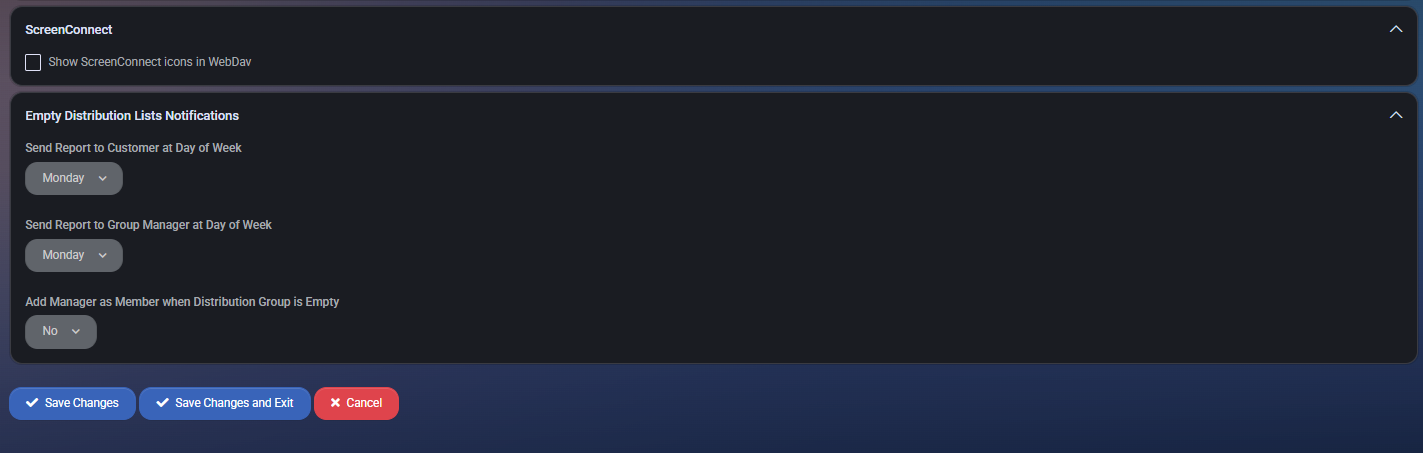
- Show ScreenConnect icons in WebDav: If enabled, adds integration icons into user file managers.
Empty distribution lists notifications
Section titled “Empty distribution lists notifications”Sends alerts for unpopulated distribution groups.
- Send Report to Customer at Day of Week: Day to send automated empty-group report to customers.
- Send Report to Group Manager at Day of Week: Weekly report for group admins.
- Add Manager as Member when Distribution Group is Empty: Automatically assigns the manager as a fallback member if the group has no participants.
Best practices
Section titled “Best practices”- Always enable breach detection for improved security hygiene.
- Define realistic password aging and complexity values that balance security with usability.
- Use 2FA (especially Microsoft MFA) as a default security baseline.
- Limit OrgId lengths if integrating with external systems to prevent overflows.
- Keep archive retention aligned with compliance or operational policies (e.g., 12 or 24 months).
- Enable automatic Active Directory import only in hybrid environments.
- Monitor empty distribution lists to ensure organizational mailing groups are functional and up-to-date.
