Exchange Plans and Retention
Global Exchange mailbox plans
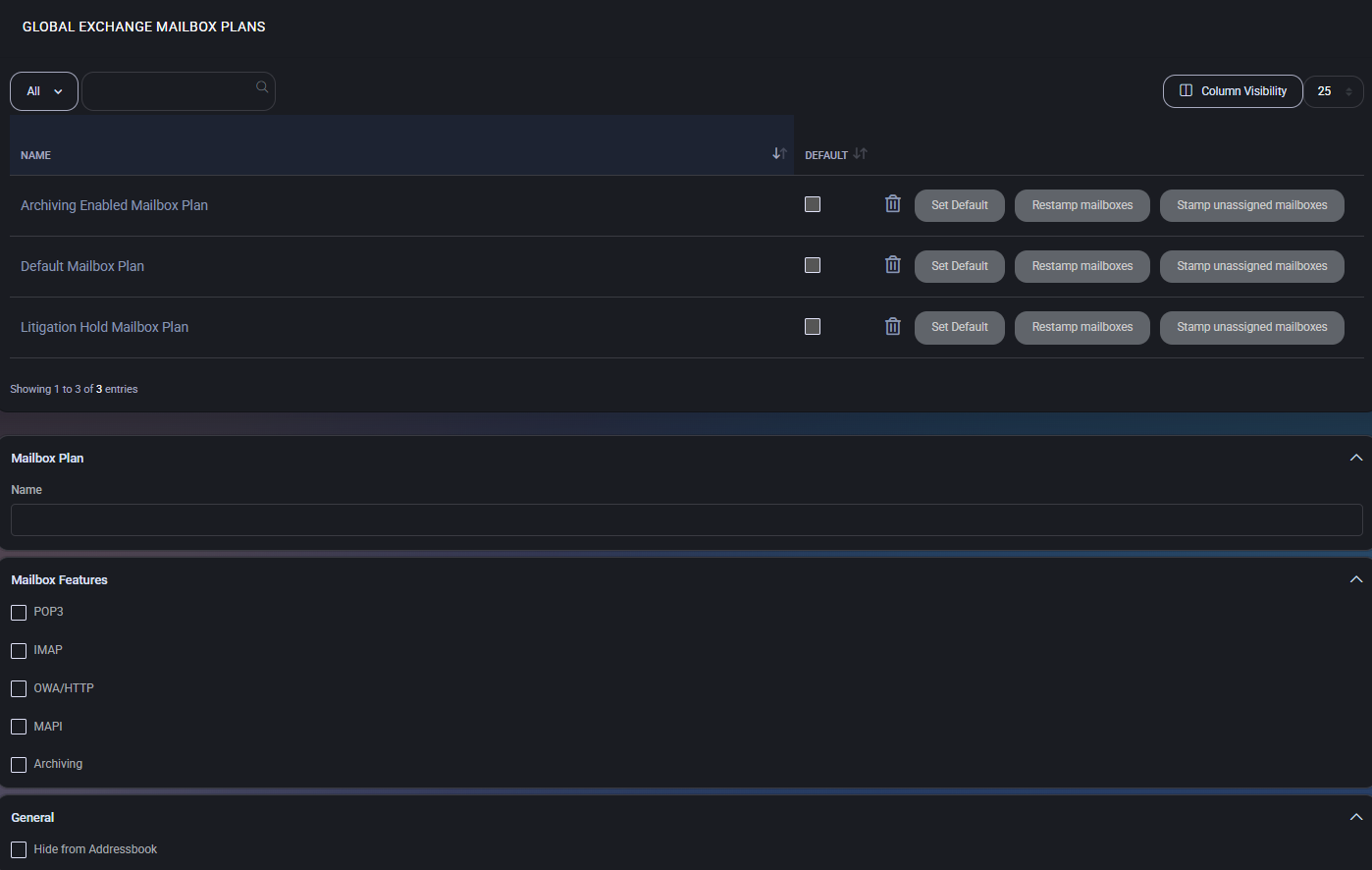
Section titled “Global Exchange mailbox plans”The Global Exchange Mailbox Plans section allows administrators to define standardized mailbox configurations with specific size quotas, protocol settings, retention behavior, and archiving options. These plans help standardize mailbox provisioning and ensure compliance across tenants.
Mailbox plans table
Section titled “Mailbox plans table”The mailbox plans list displays all defined plans. Each plan includes:
- Set as Default: The plan will be used automatically during mailbox creation if no other plan is specified.
- Restamp Mailboxes: Applies the current plan settings to all already assigned mailboxes.
- Stamp Unassigned Mailboxes: Applies this plan to mailboxes that currently have no assigned plan.
Create or edit mailbox plan
Section titled “Create or edit mailbox plan”Clicking Add New or editing an existing plan opens a configuration panel with the following sections:
Mailbox features
Section titled “Mailbox features”- POP3 / IMAP / OWA / MAPI: Toggle to enable or disable each protocol independently.
- Archiving: Enables the built-in archive mailbox for this plan.
- Hide from Addressbook: Prevents the mailbox from being listed in the GAL (Global Address List).
Quotas
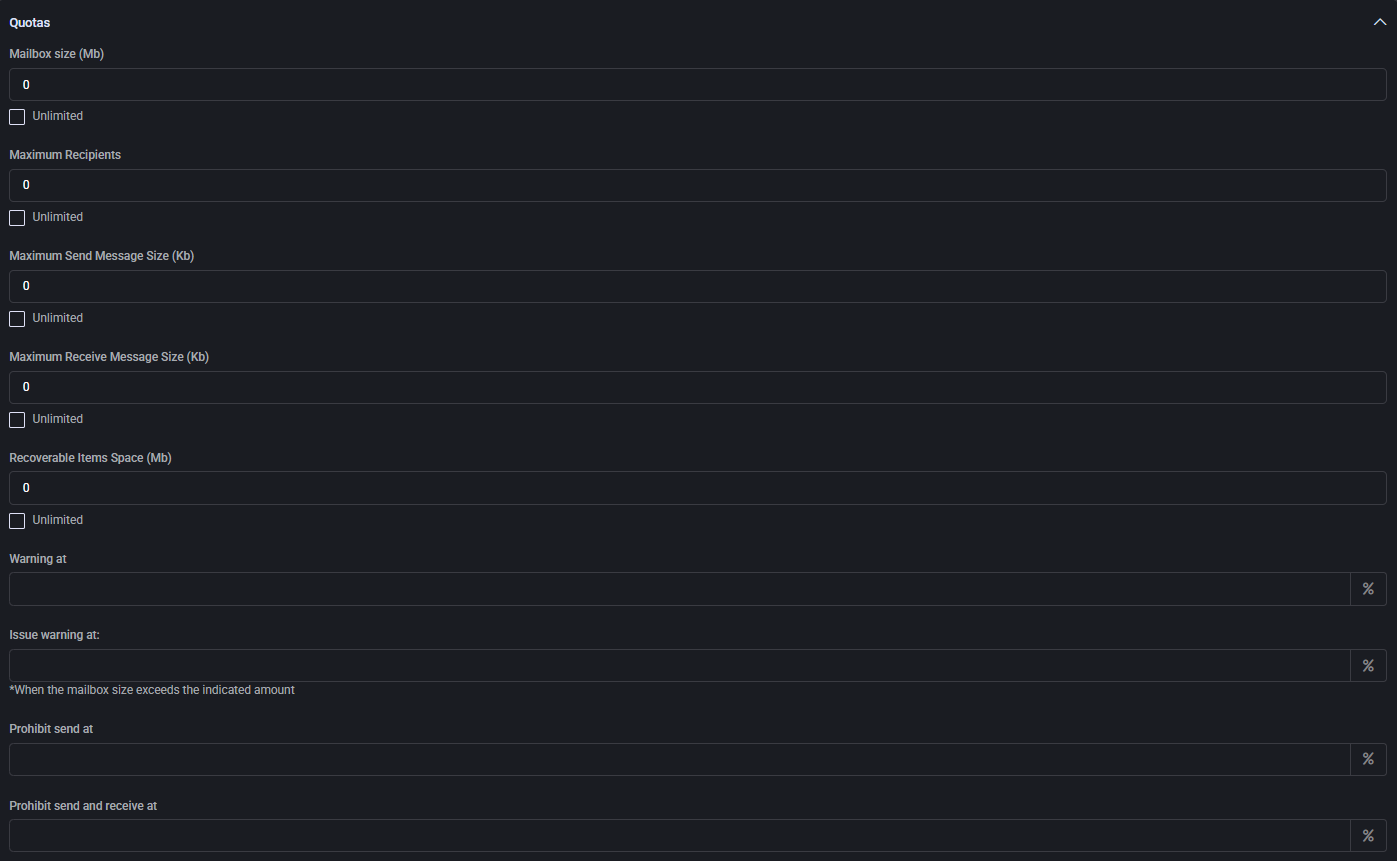
Section titled “Quotas”Define mailbox capacity and messaging limits:
- Mailbox size (MB): Total storage quota for the mailbox.
- Maximum recipients: Limit of recipients per email message.
- Send/Receive size (KB): Maximum allowed size for incoming and outgoing emails.
- Recoverable items space (MB): Storage for recoverable or deleted items.
- Warning thresholds:
- Warning users
- Issuing official warnings
- Blocking send
- Blocking send and receive
Delete item retention
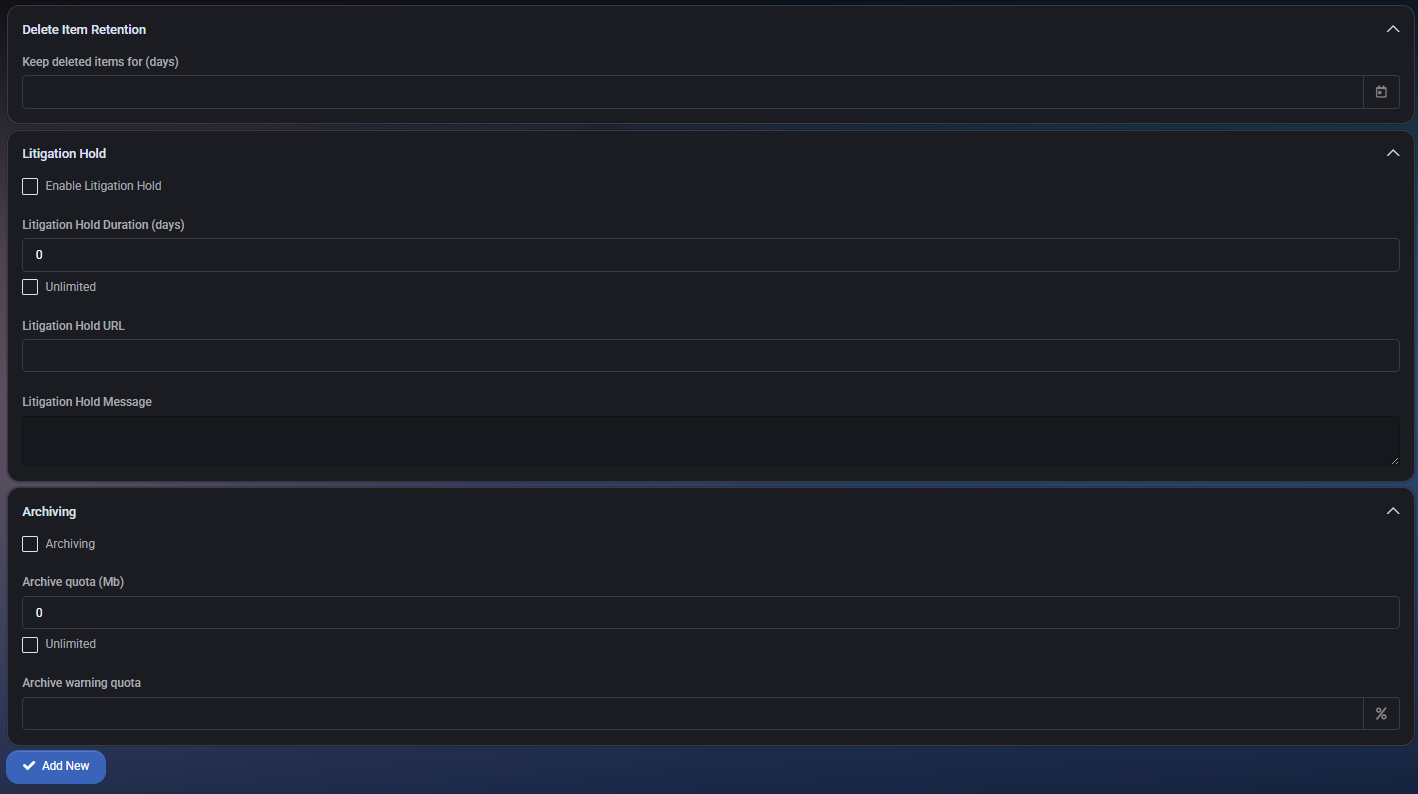
Section titled “Delete item retention”- Keep deleted items for (days): Specifies the retention period before deleted items are permanently removed.
Litigation hold
Section titled “Litigation hold”- Enable Litigation Hold: Locks mailbox data to comply with legal hold requirements.
- Litigation Hold Duration: Number of days to preserve content (or select unlimited).
- Litigation Hold URL: Optional link to compliance documentation or policy.
- Litigation Hold Message: Optional custom message for compliance display.
Archiving
Section titled “Archiving”- Archive quota (MB): Total storage limit for the archive mailbox.
- Archive warning quota: Warning threshold to notify when nearing archive quota.
Best practices
Section titled “Best practices”- Create specific mailbox plans for each business tier (e.g., Basic, Business, Compliance).
- Use the default flag for automatic mailbox plan selection during provisioning.
- Apply Restamp only when you need to synchronize updated plan values to existing mailboxes.
- Enable Litigation Hold only when legally required — it prevents deletion but can increase storage costs.
- Use mailbox quotas conservatively to avoid over-allocation and support Exchange Online limits.
Global retention policy
Section titled “Global retention policy”The Global Retention Policy section allows you to define centralized mailbox retention settings that apply across the tenant. These policies manage how long data is kept before being automatically deleted, ensuring compliance and storage optimization.
Retention policies table
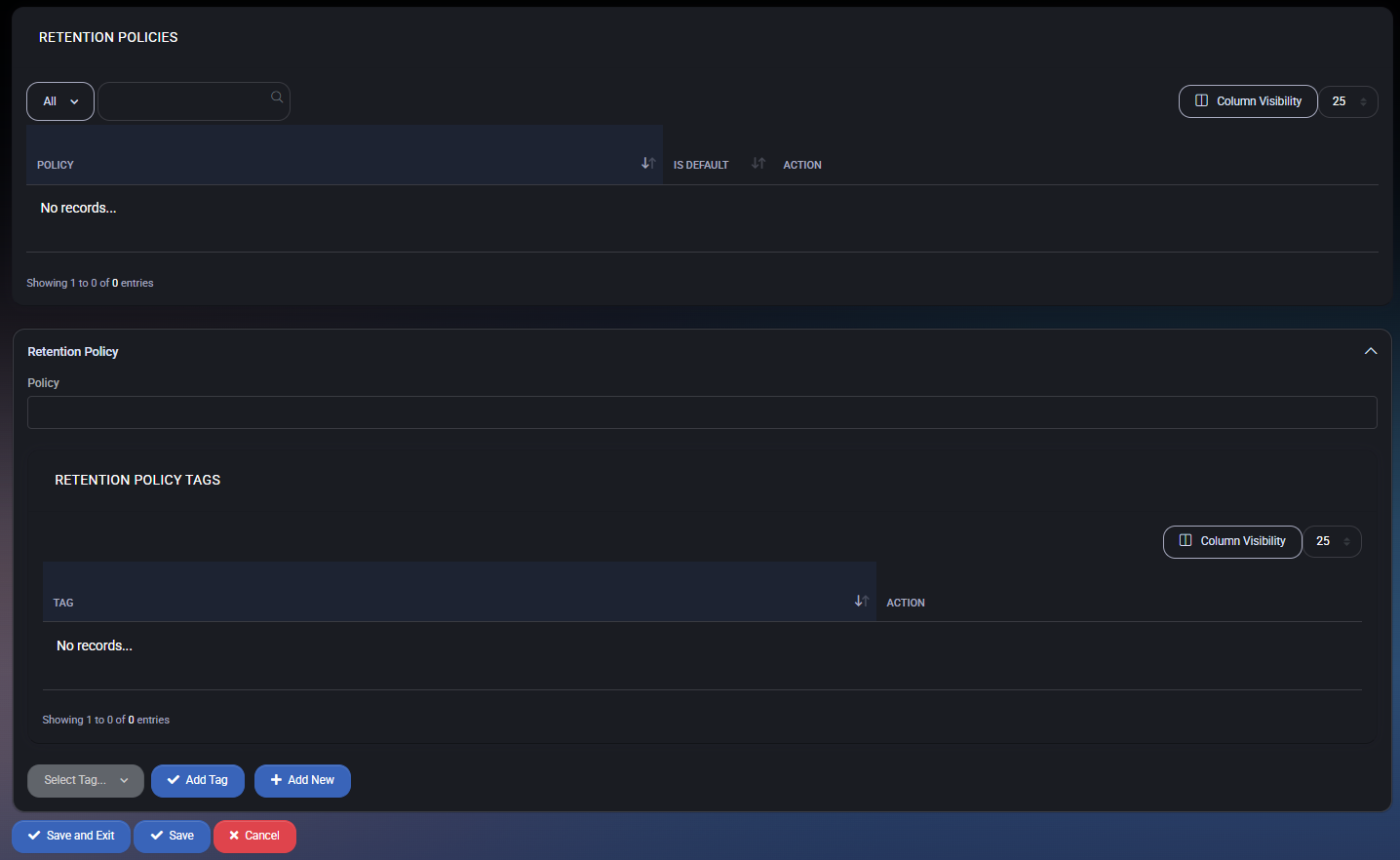
Section titled “Retention policies table”This section displays all configured retention policies. Each policy can be set as default and contains associated retention tags.
- Policy Name: Identifier for the retention policy.
- Is Default: Marks the policy as the default applied to new mailboxes or plans.
- Action: Allows editing or deleting the policy.
Create or edit retention policy
Section titled “Create or edit retention policy”Clicking Add New or editing an existing policy opens the configuration panel with the following fields:
- Policy: Enter a unique name for the retention policy.
Retention policy tags
Section titled “Retention policy tags”Each policy contains a set of tags defining specific retention actions (e.g., delete after X days, archive, etc.).
- Tag: Descriptive name for the retention action.
- Action: Controls for editing or removing the tag from the policy.
- Select Tag: Use the dropdown to choose from existing tags.
- Add Tag: Attach the selected tag to the policy.
- Add New: Create a brand new retention tag directly from this panel.
Best practices
Section titled “Best practices”- Use a default retention policy to apply basic compliance rules globally.
- Organize tags based on mailbox types (e.g., inactive, shared, project-based) to better manage data lifecycle.
- Define short-term and long-term retention tags to separate operational and compliance requirements.
- Always review tag impact before assigning them globally — especially if the tag includes permanent deletion.
Global retention policy tag
Section titled “Global retention policy tag”The Global Retention Policy Tag section allows administrators to define specific retention rules for different mailbox folders and item types across hosted tenants. These policy tags determine how long emails or items are retained and what action should be taken after the retention period expires. Policy Tags can be created and added to a Global Retention Policy for centralized enforcement. Tags can target individual folders or apply globally to all mailbox content.
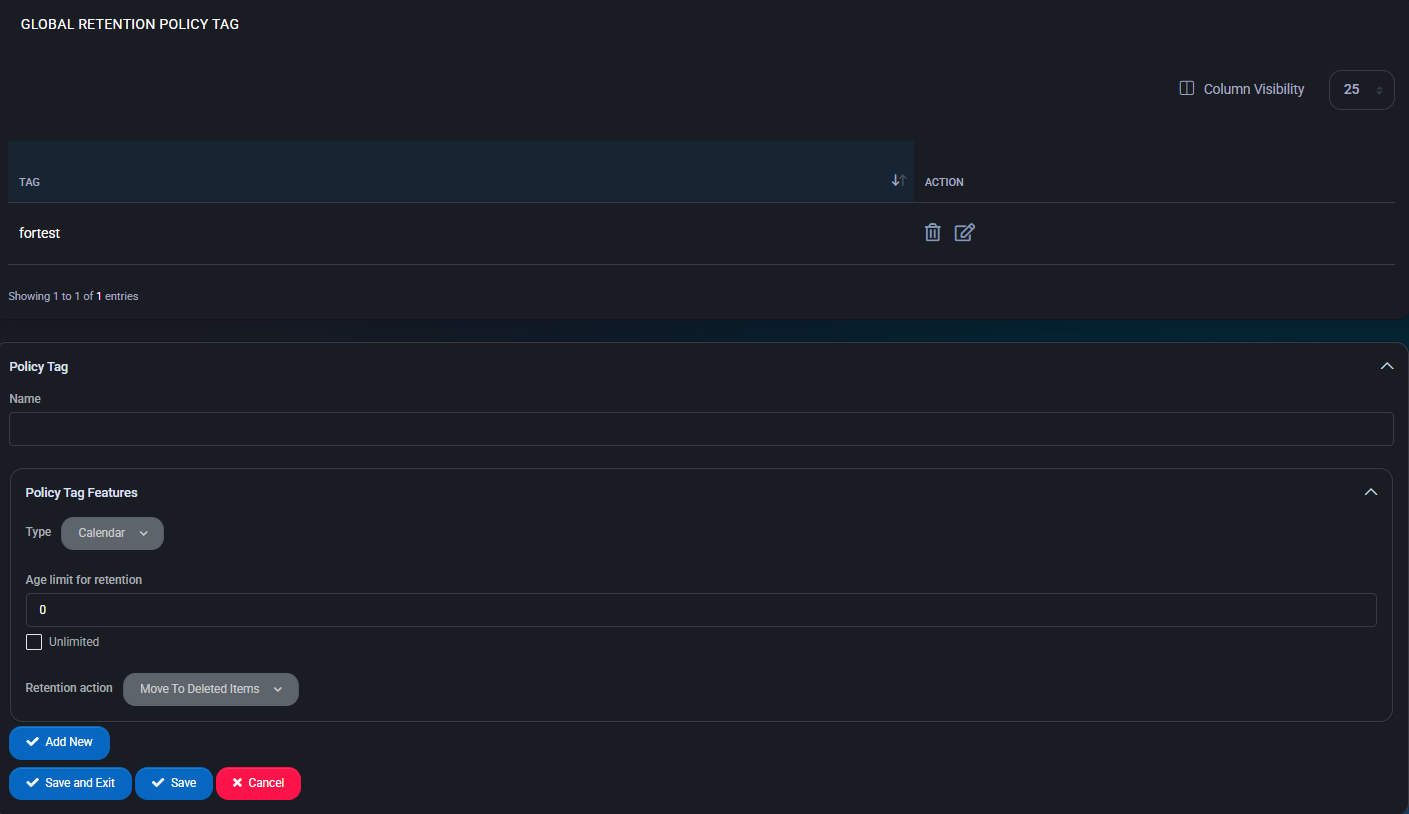
Policy tag fields
Section titled “Policy tag fields”- Name: Identifier for the retention tag.
- Type: Folder or item type the tag applies to. Options include:
- Calendar, Contacts, Deleted Items, Drafts, Inbox, Junk Email, Journal, Notes, Outbox, Sent Items, Tasks
- All (global), Managed Custom Folder, Rss Subscriptions, Sync Issues, Conversation History, Personal, Recoverable Items
- System folders like Non Ipm Root or Legacy Archive Journals
- Age Limit for Retention: Number of days before the tag’s action is triggered.
- Unlimited: Checkbox to override age limit and retain items indefinitely.
- Retention Action: Defines what happens when the age limit is reached. Options include:
- Move to Deleted Items
- Move to Folder
- Delete and Allow Recovery
- Permanently Delete
- Mark as Past Retention Limit
- Move to Archive
Best practices
Section titled “Best practices”- Use folder-specific tags for granular retention control (e.g., apply longer retention for Inbox vs. Junk).
- Prefer the “Move to Archive” action to support compliance without permanent deletion.
- Set global retention tags only when all mailbox content must be uniformly processed.
- Ensure tag names clearly indicate their purpose and duration for future reference.
- Periodically audit existing tags and their usage across policies to avoid outdated rules.
